A furniture placement tool helps you decide where sofas, beds, tables, desks, rugs, and storage should go before you move heavy furniture or buy new pieces. The best workflow is to use AI Smart Decor for fast visual layout ideas, then confirm exact furniture fit with a floor plan, AR app, or painter's tape.
This guide explains the best tools, spacing rules, room-by-room layout principles, and mistakes to avoid.
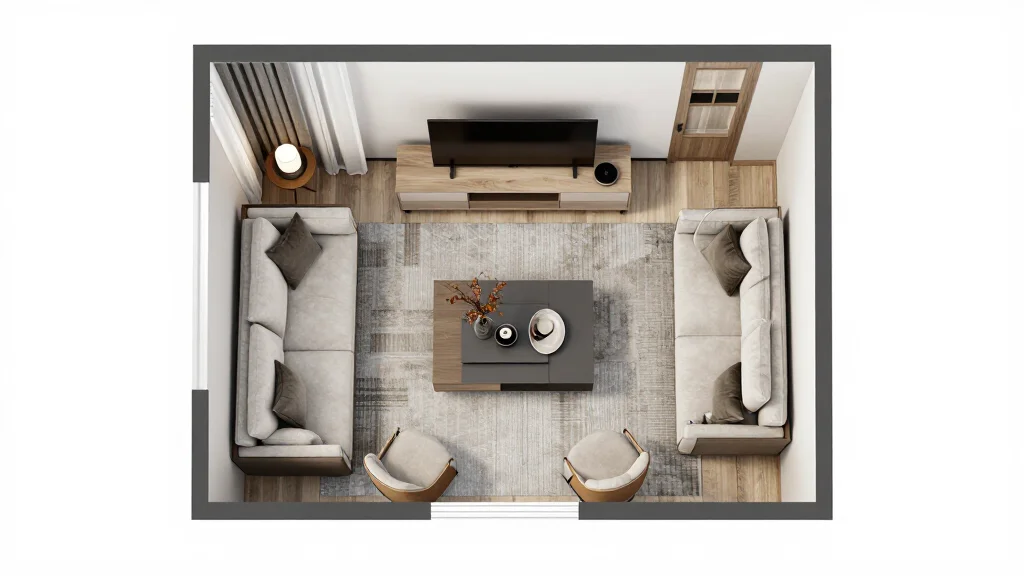
Quick Answer: Best Furniture Placement Tools
| Tool Type | Best For | Example Tools | Accuracy |
|---|---|---|---|
| AI room visualization | Fast layout inspiration | AI Smart Decor | Visual concept accuracy |
| 3D room planners | Detailed room layouts | Planner 5D, RoomSketcher | High if measured correctly |
| AR furniture apps | Previewing specific products | IKEA, Amazon, Wayfair | Good product scale |
| Floor plan apps | Measurements and exports | Magicplan, CubiCasa | High if verified |
| Painter's tape | Real-world footprint | Tape measure + tape | Very high |
What Is a Furniture Placement Tool?
A furniture placement tool is software or a physical planning method that helps you test furniture arrangements before committing. Some tools use room photos, some use measurements, and others use augmented reality to place virtual furniture in your real space.
There are three common types:
- AI furniture placement tools generate design and layout ideas from a room photo.
- Floor plan tools let you draw or scan a room and place furniture to scale.
- AR furniture tools show a specific product inside your room through your phone camera.
Each type solves a different problem. AI is fastest for inspiration. Floor plans are best for accuracy. AR is best when you are considering a specific product.
Best Furniture Placement Tools for 2026
1. AI Smart Decor — Best for Fast Visual Layout Ideas
AI Smart Decor is best when you want to see what a room could look like fully furnished or rearranged. Upload a room photo and generate layout and design ideas instantly.
Best for: Homeowners, renters, real estate agents, and DIY decorators who want visual ideas before buying furniture.
Strengths:
- Works from a room photo
- Fast AI-generated layout concepts
- Useful for furniture, rugs, art, and decor direction
- Good for empty rooms and furnished rooms
- Helps compare styles before purchasing
Limitations:
- Not a measurement replacement
- Large furniture still needs dimension checks
2. Planner 5D — Best for DIY 2D/3D Layouts
Planner 5D is useful when you want to build a room layout and test furniture in 2D or 3D.
Best for: DIY homeowners who want more layout control.
Strengths:
- 2D and 3D views
- Furniture catalog
- Free plan available
- Good for multiple arrangements
Limitations:
- More manual than AI photo tools
- Some features require payment
3. RoomSketcher — Best for Polished Layout Plans
RoomSketcher is good for clean floor plans and presentation-ready layouts.
Best for: Homeowners, real estate agents, and light design presentations.
Strengths:
- Polished plans
- Furniture placement tools
- 2D/3D viewing
- Good sharing options
Limitations:
- Paid features needed for serious use
- More setup time than AI tools
4. AR Retailer Apps — Best for Specific Furniture Products
Retailer AR tools let you see a specific product in your room.
Examples:
- IKEA Kreativ
- Amazon AR View
- Wayfair View in Room
- Target AR tools
- Houzz visualization tools
Best for: Checking whether a product looks right before buying.
Strengths:
- Uses real product dimensions
- Usually free
- Helpful for scale and color
Limitations:
- Limited to retailer catalog
- Does not design the whole room
5. Painter's Tape — Best Low-Tech Placement Tool
Painter's tape is still one of the best placement tools. Mark the exact furniture footprint on your floor before buying.
Best for: Sofas, beds, dining tables, sectionals, desks, and rugs.
Strengths:
- Cheap
- Very accurate
- Shows real walking clearance
Limitations:
- Does not show style, height, or color
Essential Furniture Placement Rules
Use these spacing rules as a starting point:
| Layout Element | Recommended Clearance |
|---|---|
| Main walkways | 30-36 inches |
| Tight secondary walkways | 24 inches minimum |
| Sofa to coffee table | 14-18 inches |
| Dining chair pull-out space | 36 inches |
| Bed side clearance | 24-30 inches |
| Desk chair clearance | 30-36 inches |
| TV viewing distance | About 1.5-2.5x screen diagonal |
| Rug under sofa | At least front legs on rug |
| Door swing clearance | Fully unobstructed |
These are guidelines, not laws. Small rooms may require compromises, but the goal is to keep movement comfortable.
Living Room Furniture Placement
Start with the focal point: TV, fireplace, window, or conversation area.
Good living room rules:
- Place the largest sofa first.
- Keep seating close enough for conversation.
- Use a rug large enough to anchor the seating area.
- Keep side tables reachable from seats.
- Avoid blocking windows and main pathways.
- Do not push every piece against the wall unless the room is very small.
For a long narrow living room, create zones: seating at one end, reading chair or desk at the other.
Bedroom Furniture Placement
Start with the bed. It should usually face the door or sit on the longest uninterrupted wall.
Bedroom rules:
- Leave space on both sides of the bed when possible.
- Use nightstands that fit the bed height.
- Keep dresser drawers clear of bed corners.
- Avoid blocking closet doors.
- Use a rug that extends beyond the bed sides.
In small bedrooms, consider wall-mounted lights, storage beds, and narrower nightstands.
Dining Room Furniture Placement
Dining rooms fail when the table technically fits but chairs cannot pull out.
Dining rules:
- Leave 36 inches around the table when possible.
- Use round tables in square or tight rooms.
- Use benches where chair clearance is limited.
- Keep traffic paths away from seated diners.
- Center the light fixture over the table, not necessarily the room.
Home Office Furniture Placement
A good home office layout balances work function, light, and camera background.
Office rules:
- Place the desk near natural light but avoid screen glare.
- Keep outlets and cable paths accessible.
- Leave chair clearance behind the desk.
- Use closed storage to reduce visual clutter.
- Consider what appears behind you on video calls.
Small Room Placement Tips
Small rooms need stricter editing.
Use:
- Furniture with exposed legs
- Wall-mounted shelves
- Storage ottomans
- Nesting tables
- Round tables
- Sliding doors where possible
- Light colors and mirrors
- Multi-functional pieces
Avoid:
- Oversized sectionals
- Deep armchairs
- Bulky TV units
- Too many small accent pieces
- Rugs that are too small
Best Workflow for Furniture Placement
- Generate ideas with AI Smart Decor. See possible room layouts quickly.
- Measure the room. Include doors, windows, outlets, radiators, and built-ins.
- Choose anchor furniture. Sofa, bed, dining table, or desk first.
- Check traffic flow. Keep main paths open.
- Tape the footprint. Confirm large pieces in the actual room.
- Use AR for specific products. Preview real furniture when available.
- Finalize with lighting and rugs. These make the layout feel intentional.
Common Furniture Placement Mistakes
- Buying furniture before measuring
- Choosing a sofa that blocks the walkway
- Using a rug that is too small
- Ignoring door swings
- Placing the TV too high
- Leaving no table near seating
- Blocking windows with tall furniture
- Overcrowding small rooms
Room-by-Room Placement Checklist
Living Room
- Sofa faces the main focal point.
- Coffee table is reachable.
- Rug connects the seating zone.
- Side tables are near seats.
- Lamps support reading and conversation.
- Walkways stay open.
Bedroom
- Bed has space on at least one side, ideally both.
- Nightstands match the bed height closely.
- Dresser drawers can open fully.
- Closet doors are not blocked.
- Rug extends beyond the bed.
Dining Room
- Chairs can pull out comfortably.
- Light fixture is centered over the table.
- Rug is large enough or skipped entirely.
- Sideboard does not pinch the walkway.
Example Small Living Room Plan
For a small apartment living room, start with a 72- to 80-inch sofa, one accent chair, a round coffee table, a media console with storage, and an 8x10 rug if the room allows it. Skip oversized sectionals unless the room is truly wide enough. Use wall shelves or a tall cabinet instead of adding several small storage pieces.
Upload a photo to AI Smart Decor for style direction, then tape the sofa, rug, and coffee table footprint before buying. The AI helps you see the finished look; the tape confirms whether the room still works.
- Forgetting outlets and lamps
- Designing for photos instead of daily use
Final Recommendation
Use AI Smart Decor when you need fast visual direction. Use floor plan tools when you need accuracy. Use AR when you are checking a specific product. Use painter's tape before buying anything large.
The best furniture placement decisions come from combining all four: AI inspiration, measured planning, AR product checks, and real-world footprint testing.