You opened the door, looked at the room, and felt it immediately: this isn't working. Maybe you've lived with it for years. Maybe you just moved in and inherited someone else's choices. Either way, you know the room needs to change — you just don't know where to start.
This guide walks you through the complete AI room makeover process, from diagnosing exactly what's wrong to implementing changes room by room with a clear budget.
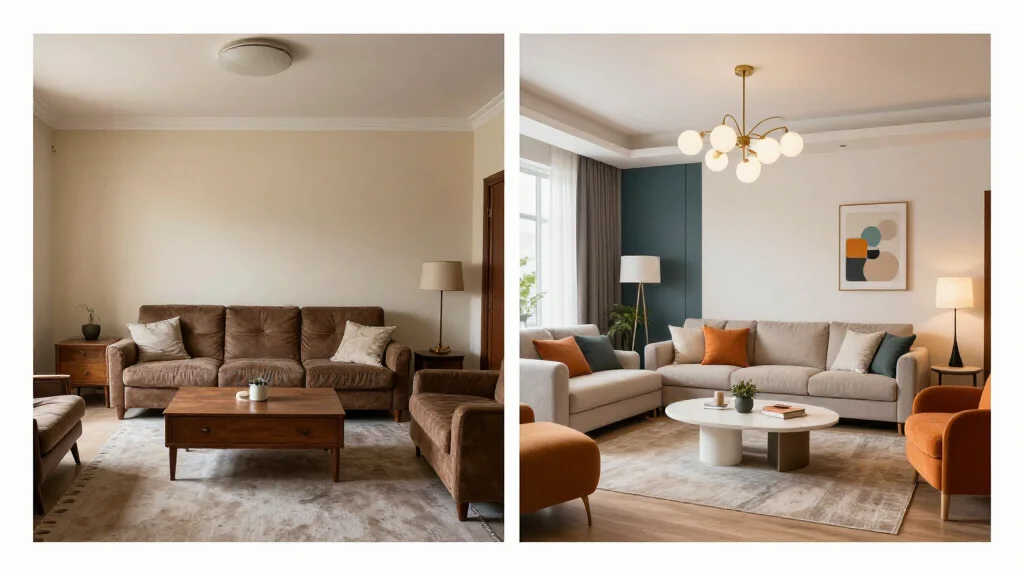
Step 1: Diagnose What's Actually Wrong
Most makeovers fail because people skip diagnosis and go straight to shopping. Don't do that. Before touching AI tools or opening a single browser tab, stand in the room and answer these questions honestly:
Identify the specific problems:
- Is the room dark? (Lighting problem, possibly color problem)
- Does it feel cramped? (Furniture scale or layout problem)
- Does it feel cold and unwelcoming? (Texture and warmth problem)
- Is it visually chaotic? (Clutter, too many competing styles, or poor focal point)
- Does the furniture look dated? (Style mismatch problem)
- Are the proportions off — furniture too small for the room, or vice versa? (Scale problem)
Write down your three biggest complaints. These become your makeover objectives. Every decision you make — AI-generated or otherwise — should address at least one of them.
Document your starting point: Photograph every wall straight-on, then shoot the four corners of the room diagonally. You'll need these for AI input and for comparing against the finished result.
Step 2: Run Your Room Through AI
With your diagnosis and photos ready, upload your room to an AI room transformation tool. AI Smart Decor lets you upload a photo and generate photorealistic redesigns across multiple styles — this is where the makeover planning actually begins.
How to get useful AI results:
- Upload your best-lit, widest photo of the room
- Run the same photo through 4-5 different style directions: modern, warm minimal, Scandinavian, mid-century, maximalist
- Don't pick your favorite style in advance — let the results surprise you
- Save every output you generate, even the ones you initially dislike
What to look for in the AI outputs:
Look beyond the style and examine the structure of what the AI changed. Did it open up the room by removing a piece of furniture? Did it brighten the space by changing wall color? Did it anchor the room with a rug? The AI is showing you what the room actually needs, not just what looks pretty.
The AI outputs from this step become your brief. You're not locked into any single generated image — you're extracting insights about what your room needs.
Step 3: Choose Your Direction
After reviewing your AI outputs, narrow down to one clear direction. Not a mood board, not "inspired by" — a specific, committed direction with defined parameters:
| Decision | Example |
|---|---|
| Primary style | Warm Scandinavian |
| Wall color | Off-white (Benjamin Moore White Dove) |
| Wood tone | Light oak throughout |
| Metal finish | Matte brass accents only |
| Textile approach | Natural linen, wool throws, no synthetics |
| What stays | Existing sofa (reupholster or add slipcover) |
| What goes | TV stand, wall art, all knick-knacks |
Write this down. Tape it to the wall if necessary. Every purchase decision during the makeover gets checked against this brief. If something doesn't fit the direction, it doesn't come home.
Step 4: Build Your Room-by-Room Implementation Plan
A room makeover isn't one decision — it's dozens. Break it down by category in priority order:
Walls and Paint (Do First)
Paint changes everything and it's cheap. Change the wall color before buying a single piece of furniture or decor. Furniture looks completely different against different wall colors, and buying furniture before painting means you might be matching to the wrong backdrop.
Use your AI outputs to confirm your color choice. Most AI tools let you run the same room through different paint colors — test at least three before committing.
Lighting (Do Second)
Lighting is the most underestimated element in any makeover. Bad lighting makes expensive furniture look cheap. Good lighting makes thrift store finds look designed. Address overhead lighting, add lamps for ambient warmth, and consider under-shelf or accent lighting if you have shelving.
AI tools typically change out lighting fixtures in their renders — pay attention to what they swapped. If every AI output added floor lamps, your room probably needs floor lamps.
Furniture (Major Pieces First)
Once walls and lighting are addressed, the furniture gaps become obvious. Work largest to smallest:
- Anchor piece (sofa, bed, dining table) — keep it or replace it
- Secondary seating or storage
- Case goods (coffee table, side tables, dresser)
Check your AI transformation outputs again at each step. Run a new AI render after each major change to see where you are.
Textiles and Soft Furnishings
Rugs, cushions, curtains, and throws are where a room gets personality. They're also where most people overspend on things that don't work together. Stick to your defined direction: two to three textures maximum, a consistent color family, and one pattern at most.
Decor and Accessories (Do Last)
Decor should be curated, not accumulated. After the furniture and textiles are in place, the room will tell you what it needs. Add a few intentional pieces — a plant, a stack of books, a piece of wall art that fits the direction — then stop.
Budget Allocation by Room Type
| Room | Paint | Lighting | Furniture | Textiles | Decor | Total |
|---|---|---|---|---|---|---|
| Living Room | $80 | $200 | $800–$2,000 | $300 | $150 | $1,530–$2,730 |
| Bedroom | $80 | $150 | $600–$1,500 | $250 | $100 | $1,180–$2,080 |
| Home Office | $60 | $200 | $500–$1,000 | $100 | $80 | $940–$1,440 |
| Dining Room | $80 | $250 | $600–$1,500 | $150 | $100 | $1,180–$2,080 |
These are midrange figures assuming a mix of new and secondhand pieces. The AI planning phase helps you avoid the most common budget leak: buying the wrong thing.
Step 5: Implement and Reassess
Most makeovers stall because people try to do everything at once and run out of money or energy halfway through. Work in phases:
Phase 1 (Week 1): Clear and declutter. Remove everything that doesn't belong in the direction you defined. Live with the empty room for a day before adding anything.
Phase 2 (Week 2): Paint and lighting. Make these changes before any furniture arrives.
Phase 3 (Weeks 3–4): Furniture and rugs. Photograph the room after each addition and run it through AI Smart Decor again if you're unsure about the next step.
Phase 4 (Week 5+): Textiles, decor, and final adjustments.
The reassessment step is critical. After each phase, look at the room fresh. Run a new AI render if something feels off. The AI transformation tool works as a diagnostic at every stage, not just at the beginning.
Common Makeover Mistakes to Avoid
Buying furniture before painting: The wall color changes how every piece of furniture looks. Always paint first.
Choosing the rug last: The rug should anchor the furniture arrangement, not be squeezed in afterward. Pick the rug before the secondary furniture.
Overfilling the room: The AI outputs will generally show you a cleaner, less-cluttered version of your room. That editing is intentional. Resist the urge to fill every surface.
Matching everything: Perfectly matched sets look cheap. Cohesion comes from consistent color palette and material finishes, not identical furniture.
Ignoring ceiling height: Low ceilings need vertical elements (tall curtains, vertical art). High ceilings need warmth pulled down (pendant lights hung low, shelving at eye level). AI tools handle this automatically — notice what they do with height in your renders.
Room Makeover Checklist
Before you call the makeover done, check:
- The room solves the original three problems you wrote down.
- The main walkway is clear.
- The rug fits the furniture zone.
- Lighting comes from more than one source.
- Storage handles daily clutter.
- The palette has a base, secondary color, and accent.
- At least one personal element remains.
- Every new purchase has a role.
If the answer is no, do not keep shopping randomly. Return to the diagnosis. The room may need better storage, a larger rug, or warmer light rather than more decor.
Example: Budget Living Room Makeover
For a living room with a usable sofa but poor lighting and no clear style, spend in this order:
- Paint or wall refresh: $60-$120
- Large rug: $200-$600
- Two lamps: $120-$300
- Curtains: $80-$250
- Coffee table or side tables: $150-$500
- Pillows, art, plants, and final decor: $100-$250
That plan changes the room without replacing every major piece. Use AI at the beginning to choose the direction, then again after the rug and lighting are in place to decide what still feels missing.
Ready to Start?
The diagnosis is free. The AI transformation costs nothing to try. Upload your room photo, run it through several styles, and you'll know within ten minutes what your room actually needs.