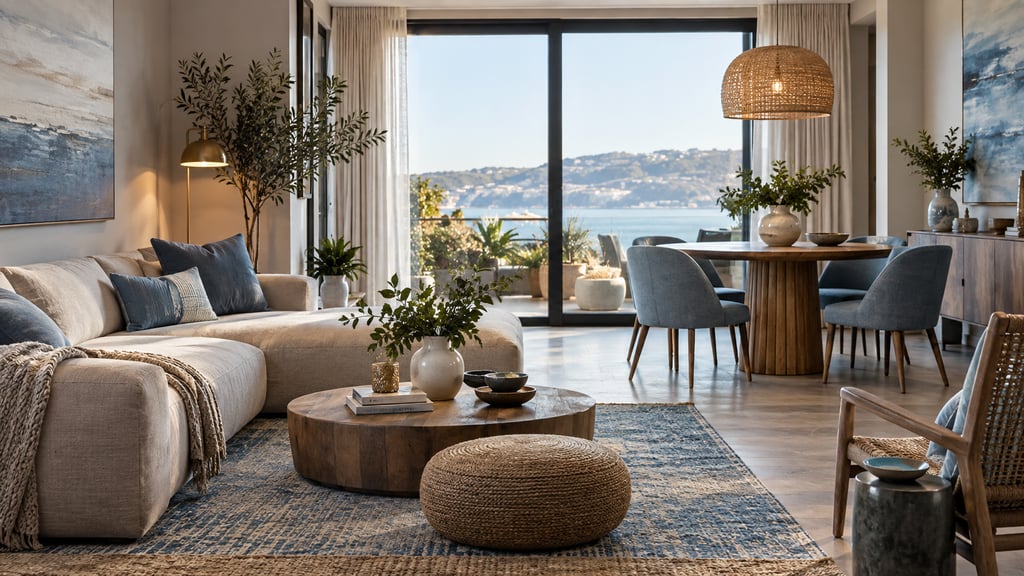
Layout Design vs. Furniture Placement
These are not the same thing.
See new furniture in your own room before you buy it. Upload a room photo and describe the pieces you want to try. Plans start at $9/month for 200 designs. Start designing
Furniture placement is the spatial problem: does the sofa fit, is there clearance to walk, can the door open. It's solved with measurements and rules.
Layout design is the experiential problem: does the room feel balanced, does it draw you toward the right focal point, does it feel calm or energized, do different activities feel distinct even in a shared space. It's solved with design principles.
Most room planning tools, including many AI tools, handle furniture placement well. Fewer handle layout design at a deeper level. The best outcomes come when you apply spatial rules AND design principles to the same room.
Zone Planning: Creating Structure in Open Space
A zone is a defined area for a specific activity within a larger space. Living rooms have a TV viewing zone, a conversation zone, sometimes a reading nook. Open-plan spaces have kitchen, dining, and living zones within one continuous floor plate.
Zones are not about walls. A zone exists because of how the furniture is arranged, where the rug sits, and where the light source is.
How to Define a Zone
Furniture orientation: Seating turned inward toward a central coffee table forms a conversation zone. Seating angled toward a TV screen forms a media zone. The angle of furniture is the primary signal.
Rug anchoring: A rug defines the exact footprint of a zone. Every piece within a zone should relate to the rug — front legs on the rug at minimum. A rug-free zone feels unanchored.
Lighting: A floor lamp or pendant directly overhead marks a zone's center. A reading zone without a dedicated light source isn't a zone — it's just a chair in a corner.
Vertical elements: A bookshelf, plant grouping, or room divider creates a soft visual boundary between zones without blocking sightlines or light.
Zone Planning by Room Type
Open-plan living: Identify three zones minimum — kitchen work zone, dining zone, living zone. Give each zone a rug and a distinct light source. Orient seating in the living zone to face away from the kitchen (creates psychological separation even with no wall).
Primary bedroom: Sleep zone (bed, nightstands, ambient lighting) and dressing zone (wardrobe, mirror, task lighting) are the two core zones. In larger rooms, a seating zone (chair or small settee) adds a third.
Home office: Work zone (desk, task lighting) and file/storage zone. If the room also serves a secondary function (guest room, reading room), that zone needs its own light source and defined footprint.
Children's rooms: Sleep zone and play zone — the critical design rule is that these two zones face away from each other or have a physical divider so the play zone doesn't visually activate the sleep zone.
Focal Points: Where the Eye Goes First
Every room has a focal point — the visual anchor that the eye goes to first when entering. Good layout design identifies this point and organizes the room around it. Bad layout design either ignores it or accidentally creates competing focal points.
Natural vs. Created Focal Points
Natural focal points are architectural: fireplace, large window with a view, exposed brick wall, bay window, double-height ceiling.
Created focal points are designed: gallery wall, large-format art, statement piece of furniture (a velvet sofa in a bright color, a carved headboard), an oversized mirror, a structural plant.
A room should have one dominant focal point and, optionally, one or two secondary focal points. Two competing focal points of equal weight create visual confusion. The room doesn't know where to "settle."
Orienting a Room Around Its Focal Point
When you identify the focal point, orient your primary seating or activity zone to face it. In a living room with a fireplace, the sofa faces the fireplace. In a bedroom, the bed headboard goes on the most visible wall — the one facing the entry — because the bed is the focal point.
The most common focal point mistake in living rooms: the TV is the actual focal point (the screen dominates), but the room is arranged to face a fireplace on a different wall. The result is everyone sits sideways to see the TV. Fix this by combining the TV and fireplace on the same wall, or by accepting the TV is the focal point and arranging accordingly.
AI and Focal Points
AI Smart Decor identifies the room's focal point from photo analysis or user input and orients seating accordingly. If a photo shows a large window, the AI positions seating to take advantage of the view rather than face away from it. This single adjustment — which humans often miss — changes how a room feels entirely.
Balance and Symmetry in Room Design
Balance is the distribution of visual weight throughout a room. An unbalanced room feels like it's tipping — heavy on one side, sparse on the other.
Symmetrical Balance
Symmetrical balance mirrors elements on either side of a central axis. Matching nightstands flanking a bed. Two identical armchairs on either side of a fireplace. Symmetrical arrangements read as formal, calm, and resolved.
When to use symmetry: bedrooms (inherently symmetrical around the bed), formal dining rooms, living rooms with a central fireplace.
When symmetry feels wrong: small irregular rooms (perfect symmetry in an imperfect space looks forced), eclectic styles, rooms where one wall has an awkward architectural feature that breaks the axis.
Asymmetrical Balance
Asymmetrical balance uses different elements of similar visual weight on either side of a central point. A large sofa on one side balanced by a console table plus large plant on the other side. Both sides have similar weight, but different elements.
Asymmetrical balance feels more relaxed and contemporary than symmetrical balance. It's harder to achieve but more flexible in real rooms where architectural features are rarely perfectly centered.
Visual Weight
Not all furniture weighs the same visually. Factors that increase visual weight:
- Dark or saturated color
- Heavy, solid profiles (no legs, thick arms)
- High placement (raised furniture reads as heavier than low pieces)
- Quantity (cluster of small items can equal one large item)
- Pattern (busy upholstery reads heavier than solid)
AI layout tools factor visual weight when generating symmetrical or asymmetrical arrangements — placing a large dark sofa opposite a cluster of lighter elements rather than another large dark piece.
Proportion and Scale: Making Furniture Fit the Room
Proportion is relative. A 9-foot sofa in a 20-foot living room is properly proportioned. The same sofa in a 12-foot room is not. The issue isn't the sofa's absolute size — it's its size relative to everything around it.
Room-to-Furniture Proportion
- Dominant piece (sofa, bed, dining table): Should occupy no more than one-third of the floor area
- Sofa on a wall: Length should not exceed two-thirds of the wall behind it
- Dining table: Width should leave 36–44 inches on all sides for chair clearance; length should fit within the same clearance
- Coffee table: Length approximately two-thirds of the sofa length; height within 2 inches of sofa seat
Scale Consistency Within a Room
Furniture pieces within a conversation grouping should share relative scale. A massive sectional with a tiny side table creates scale contrast that looks accidental. A large sofa with a proportionally sized coffee table and armchairs of matching seat height looks intentional.
Mixing scales deliberately — a very low-profile sofa with tall, architectural floor lamps — creates intentional contrast. The key word is "deliberately." Random scale variation looks like a mistake; designed scale contrast looks sophisticated.
How AI Handles Proportion
AI layout tools check furniture dimensions against room dimensions before generating layouts. A piece that exceeds proportion thresholds is flagged or excluded from suggestions. This is one of the clearest advantages of AI layout generation over manual planning — the proportion check is automatic.
How Layout Affects Mood
Room layout has measurable psychological effects that interior designers have studied extensively. These aren't abstract — they affect how you feel in a space every day.
Open Central Space = Calm
A room where the center is clear — furniture arranged at the perimeter with an open middle — feels spacious and calm. The visual field has room to "breathe." This is why minimal rooms feel serene even when they're not physically large.
Conversely, filling the center of a room with furniture creates visual density that registers as claustrophobic even in a large space.
Vertical Height = Energy
Rooms that draw the eye upward feel energetic and alive. Tall bookshelves, vertical art, pendant lights hung at ceiling height, plants that reach toward the light — all of these lift the gaze and create a sense of vitality.
Low furniture arrangements — everything at sofa and coffee table height — feel calm but can feel flat. Mixing heights creates rhythm: something low, something medium, something tall in each area.
Symmetry = Formality and Calm
Symmetrical arrangements read as composed, formal, and stable. This is useful in spaces where you want to feel settled — bedrooms, reading rooms, formal dining rooms. It becomes a liability in spaces that should feel casual and flexible.
Fragmentation = Anxiety
A room with furniture scattered randomly — no clear groupings, no defined zones — creates unconscious disorientation. The eye doesn't know where to rest. Good zone planning resolves this: even in a large, multi-function room, clearly defined zones create order that registers as calming.
Applying Design Principles with AI Tools
The most effective use of AI layout tools is as a starting point, not a final answer. AI applies the spatial and design rules correctly. You then edit for psychological effect and personal context.
Step 1: Generate with AI: upload your room to AI Smart Decor or your preferred tool; get layout options that satisfy clearance, proportion, and focal point rules automatically
Step 2: Evaluate for balance: does the generated layout feel heavy on one side? Are the zones clearly defined? Does the primary seating face the focal point?
Step 3: Edit for mood: if you want calm, clear the center; if you want energy, add vertical elements; if you want formality, push toward symmetry
Step 4: Test zone boundaries: mentally walk through each zone transition: does it feel like moving from one activity to another, or does it feel continuous?
Step 5: Check the focal point experience: stand in the room's entry point (in the planner or in your imagination). What does your eye go to first? Is that the intended focal point?
Step 6: Review from all angles in 3D: layout design problems that are invisible in 2D become obvious in perspective view. Use the 3D walk-through to catch balance and proportion issues.
AI Room Layout Design Tool Comparison
| Tool | AI Layout Generation | Zone Planning | Focal Point Detection | 3D Visualization | Free Tier |
|---|---|---|---|---|---|
| AI Smart Decor | Full AI generation from photo | Automatic | Yes (from photo) | 3 monthly generations; paid from $9/mo | |
| Planner 5D | AI assistant suggestions | Manual | Limited | ||
| Homestyler | AI decoration mode | Manual | Yes (ads) | ||
| Coohom | AI furniture matching | Manual | Yes (4K paid) | Limited | |
| RoomSketcher | None | Manual | Paid only | 2D free |
Design Principles Checklist for Any Room Layout
Before finalizing a room layout — AI-generated or manual — run through this checklist:
- Primary seating faces the focal point
- One dominant focal point (no competing focal points of equal weight)
- Clear traffic path from every door to every activity zone (36 inches minimum)
- All conversation seating within 8 feet of each other
- Each zone anchored by a rug and a dedicated light source
- Visual weight distributed across the room (not all heavy pieces on one side)
- Furniture proportioned correctly to room and to each other
- Center of room clear or lightly furnished
- At least one vertical element per zone to lift the eye
- No competing focal points of equal visual weight
Start with AI, Finish with Design
Upload your room photo to AI Smart Decor to get a layout that's structurally sound from the first generation. Then apply the design principles above to edit toward the room you actually want.
