A good home office should support focus, comfort, storage, and video calls. It does not need to be large, but it does need a clear layout and fewer distractions.
Use AI Smart Decor to test home office design ideas in your actual space before buying a desk, shelves, paint, or lighting.
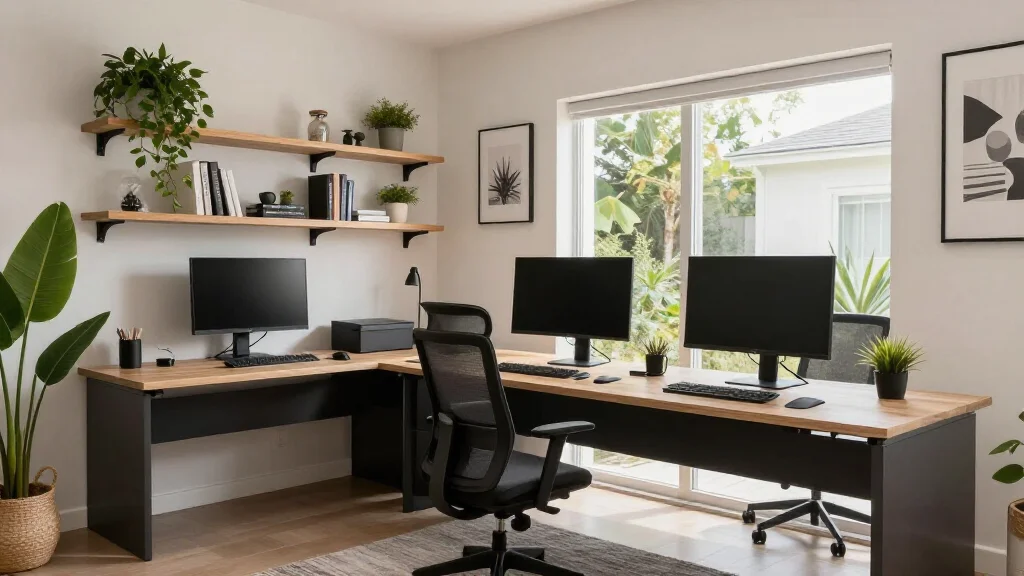
Quick Answer: Home Office Design Checklist
| Element | Best Practice | Why It Matters |
|---|---|---|
| Desk placement | Good light, outlets, and circulation | Supports daily work |
| Chair | Ergonomic and properly sized | Prevents discomfort |
| Lighting | Task light + ambient light | Reduces eye strain |
| Storage | Closed storage where possible | Keeps background clean |
| Cable management | Hidden cords and chargers | Makes office look finished |
| Color | Calm and focus-friendly | Affects mood and productivity |
| Background | Simple and intentional | Improves video calls |
Start with Desk Placement
Desk placement should solve practical needs first.
Check:
- Outlet access
- Natural light direction
- Monitor glare
- Door swing
- Chair clearance
- Video-call background
- Wi-Fi signal
- Storage access
If possible, place the desk so you are not staring directly at a blank wall all day. A side window often works better than a window directly behind the screen.
Step-by-Step Home Office Design Process
Step 1: Define the Work You Actually Do
A home office for laptop work needs a different setup than an office for video calls, design work, bookkeeping, tutoring, gaming, or two monitors. Write down the daily tasks before buying furniture.
Common needs:
- Laptop and notebook space
- One or two monitors
- Printer or scanner
- Video-call background
- Filing storage
- Craft or design supplies
- Quiet reading area
- Guest room conversion
The office should support the work first. Style comes after the work surface, chair, lighting, and storage are right.
Step 2: Test Desk Positions
Try at least two desk positions before committing. A desk facing a wall may save space, but a floating desk can feel better if the room is large enough. A side-window setup often gives the best mix of daylight and low glare.
Check each position for:
- Can the chair pull out fully?
- Is there glare on the monitor?
- Are outlets close enough?
- Does the background look clean on calls?
- Can shelves or storage be reached easily?
- Does the desk block closet or door access?
Use furniture placement tool if you need help testing the layout.
Choose the Right Desk
The right desk depends on your work.
Desk ideas:
- Writing desk for laptop work
- Sit-stand desk for long workdays
- L-shaped desk for multiple monitors
- Wall-mounted desk for small rooms
- Built-in desk for permanent offices
- Console table desk for guest rooms
Make sure the desk depth works for your monitor, keyboard, notebook, and task lighting.
Ergonomic Basics
A beautiful office is not useful if it hurts to work in.
Basics:
- Feet should rest flat on the floor or footrest.
- Monitor top should be near eye level.
- Elbows should rest around 90 degrees.
- Chair should support your lower back.
- Keyboard and mouse should be close enough to avoid reaching.
Design around the body first, then style around the setup.
Home Office Measurements to Check
| Item | Practical Target |
|---|---|
| Desk depth | 24-30 inches for most setups |
| Desk width | 48 inches or more if space allows |
| Chair clearance | 30+ inches behind the desk |
| Monitor distance | About an arm's length |
| Keyboard height | Elbows near 90 degrees |
| Shelf depth | 10-14 inches for books and decor |
| File cabinet depth | Check drawer pull-out space |
These numbers do not need to be perfect, but they help prevent the most common mistake: a desk that looks good online but feels too shallow for real work.
Lighting Ideas
Use layered lighting:
- Ambient ceiling light for general brightness
- Desk lamp for task work
- Soft background lamp for video calls
- Window treatments to control glare
Avoid sitting with a bright window directly behind you on calls. It makes your face look dark.
Storage Ideas
Home offices quickly collect paper, chargers, notebooks, tools, and equipment.
Good storage options:
- Closed cabinet
- Drawer unit
- Floating shelves
- Wall organizer
- Built-in bookcase
- Baskets for supplies
- Printer cabinet
- Cable tray under desk
Keep frequently used items close and rarely used items hidden.
Video-Call Background Ideas
A good video background is simple and intentional.
Use:
- Bookshelf with edited styling
- Art wall
- Plant and lamp
- Closed cabinet
- Neutral wall with texture
- A few personal objects
Avoid messy open storage, bright windows, and cluttered corners.
Small Home Office Ideas
For small offices:
- Use vertical shelves
- Choose a narrower desk
- Mount lights on the wall
- Use a rolling drawer unit
- Add a mirror to reflect light
- Keep colors light
- Use one accent wall instead of many decor pieces
A small office should feel calm, not packed.
Home Office Ideas by Space Type
Bedroom Office
Use a desk that can stay visually quiet after work. Choose closed storage, a small lamp, and a chair that does not look too corporate beside bedroom furniture. Keep the desk out of the direct view from the bed if possible.
Living Room Office
Use a console-style desk, cabinet desk, or bookcase wall so the office blends into the room. Hide cables and choose a chair that works with the living room style.
Closet Office
A closet office can work well for laptop jobs. Add a fitted desktop, wall shelves, task light, outlet access, and a stool or compact chair. Use doors or a curtain to close it when the workday ends.
Shared Office
For two people, plan separate task lights, cable zones, and storage. A long desk can work if both users have enough elbow room. If calls overlap, consider two smaller work zones instead of one shared wall.
Home Office Color Ideas
Good palettes:
- Warm white + oak + black accents
- Sage green + cream + brass
- Muted blue + walnut + white trim
- Greige + charcoal + linen
- Olive + warm wood + tan leather
Choose colors that support your work energy. Creative work may benefit from more personality; analytical work may benefit from a calmer palette.
AI Home Office Design Prompt
Redesign this room as a functional home office. Preserve the room structure, windows, doors, flooring, and realistic proportions. Add a properly placed desk, ergonomic chair, task lighting, closed storage, cable management, a calm video-call background, warm neutral colors, and minimal decor. Make it photorealistic, productive, uncluttered, and comfortable for daily work.
Extra Home Office Prompts
Small Home Office
Redesign this small room as a practical home office with a compact desk, comfortable chair, wall storage, task lighting, hidden cables, and a calm neutral palette. Keep walkways clear and avoid bulky furniture.
Video-Call Office
Create a home office with a clean video-call background, good front lighting, closed storage, a desk with monitor space, a comfortable chair, art, a plant, and warm neutral colors. Keep the design professional but not cold.
Guest Room Office
Redesign this room as a combined guest room and home office. Include a compact desk, comfortable work chair, sleeper sofa or guest bed, closed storage, soft lighting, and a calm style that works for both work and guests.
Common Home Office Mistakes
- Desk faces glare
- Chair is decorative but uncomfortable
- No closed storage
- Cables are visible everywhere
- Background is cluttered on video calls
- Lighting is too harsh or too dim
- Desk is too shallow
- Room has no visual warmth
Home Office Design Review Checklist
Before committing to the layout, sit at the desk for ten minutes with your laptop, notebook, and anything you use daily. Check the screen for glare, test the chair clearance, and turn on the camera to see the background.
Review these details:
- The chair supports long work sessions.
- The desk is deep enough for monitor and keyboard.
- The main light does not reflect on the screen.
- Cables have a path to outlets.
- Supplies have closed storage.
- The call background is calm and uncluttered.
- The room still works after the laptop closes.
If the office shares another room, the end-of-day reset matters as much as the work setup.
When to Use AI for Home Office Design
Use AI before buying a desk, shelves, paint, or lighting. Test the desk on different walls, compare a closed-storage setup with open shelves, and check how the call background looks from the camera angle. This is faster than moving furniture repeatedly and helps you spot glare, clutter, and awkward wall space before you spend money.
If two layouts seem close, choose the one that makes the workday easier to end. A home office that can be reset quickly is easier to live with, especially in a bedroom, living room, or shared space. Closed storage and cable control usually matter more than extra decor.
Home Office Shopping Order
Start with the chair and desk because comfort matters most. Then add lighting, storage, cable management, window treatments, and background decor. Buying decorative shelves before solving ergonomics often creates an office that looks good in photos but feels frustrating during real workdays.
If the office shares space with a bedroom or guest room, choose furniture that can close or hide visual clutter. A cabinet, secretary desk, storage ottoman, or closet office can keep work from taking over the room after hours.
Practical Measurement Reminder
Before turning any AI concept into purchases, measure the room, doorways, ceiling height, existing furniture, and main walkways. Write the measurements in a note and keep them open while shopping. This small step prevents most scale mistakes and makes the final room feel closer to the AI concept you selected.
Final Recommendation
Design your home office around work habits first. Place the desk for light and comfort, choose an ergonomic chair, add storage, improve lighting, and create a clean background. Use AI Smart Decor to preview different layouts and styles before buying furniture.
Related Articles
- How to Furnish an Empty Room
- Furniture Placement Tool
- Modern Interior Design
- AI Room Design Tool
- How to Visualize Room Layout
Also photograph the finished room after each major change so you can compare progress against the original AI concept and adjust before buying the next piece.