Not all free virtual staging tools are created equal, and not all of them use the same approach. Some rely on AI to automatically generate furnished rooms. Others give you 3D modeling tools to place furniture manually. A few use augmented reality to overlay furniture in real time. And then there are creative workarounds using general-purpose design tools. This is the definitive ranking of the best free virtual staging options across every category, evaluated on output quality, ease of use, paid tier generosity, and practical usefulness for real estate.
For AI-specific paid options, see our guide to free virtual staging AI. For browser-only tools, check out free online virtual staging.
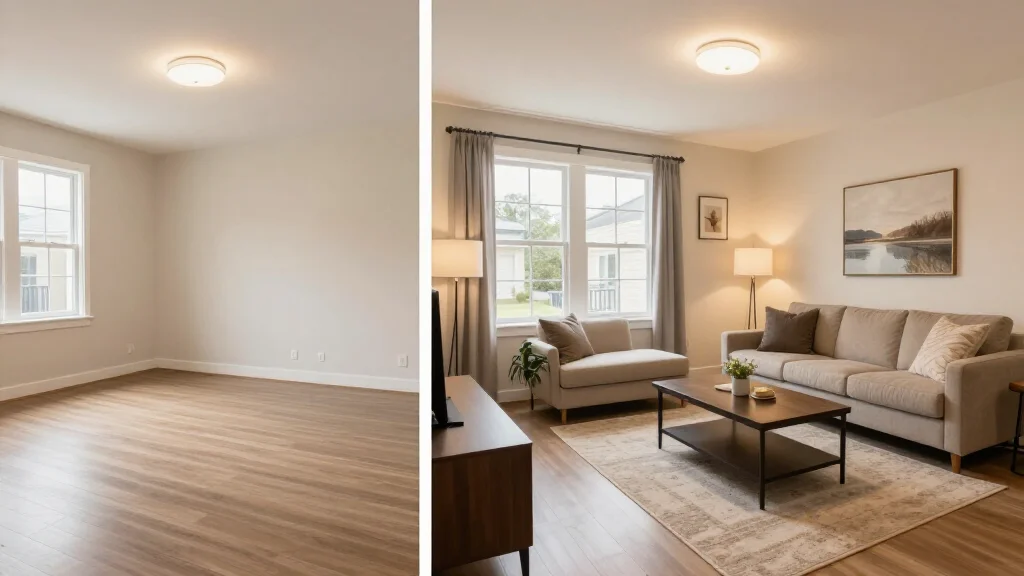
Quick Answer: What is the best free virtual staging tool?
The strongest paid-access option is AI Smart Decor for AI-generated staged photos, RoomGPT for quick experiments, and Planner 5D if you prefer manual 3D layout control. Free tools are best for testing and light marketing; paid plans are safer for high-volume MLS workflows.
How We Ranked These Tools
Every tool on this list was tested with the same set of empty room photos — a living room, a bedroom, and a kitchen. We evaluated each on five criteria.
Output quality: How realistic and professional does the result look? Free tier generosity: How much can you actually do before hitting a paywall? Ease of use: How quickly can a non-technical user produce a result? Speed: How long from upload to finished image? Practical value: Is the output genuinely usable for real estate listings?
Each tool received a score out of 10 based on these criteria.
Category 1: AI Free Staging
AI staging tools are the fastest and easiest option. You upload a photo and the AI does the rest. Here are the best free AI staging tools ranked.
1. AI Smart Decor — Score: 9/10
AI Smart Decor earns the top spot. The paid plan offers multiple renders with paid access. Output quality is the highest among comparable tools — accurate furniture scale, consistent shadows, and excellent style coherence. Works in any browser, generates results in under a minute, and requires zero learning curve.
Strengths: Best quality, generous paid tier, a payment method, fast generation Limitations: Monthly render cap, fewer styles than paid plan
2. RoomGPT — Score: 7/10
Solid second choice. Small number of free renders with steady quality for standard rooms. Slightly less polished than AI Smart Decor in shadow rendering and variety, but usable for online listings.
Strengths: Simple interface, decent quality, quick results Limitations: Very limited free renders, fewer styles, occasional scale issues
3. Home Visualization Trial Tool — Score: 7/10
Free credits on signup for both empty room staging and room redesigns. Good quality for living rooms and bedrooms, less consistent for kitchens.
Strengths: Room redesign capability, good color matching, simple interface Limitations: Limited credits, inconsistent kitchen staging, repetitive styles
4. InteriorAI — Score: 6/10
Provides limited free generations with some unique style options not found on other platforms. The creative output is interesting but sometimes prioritizes visual drama over listing-appropriate realism. Best for agents who want a distinctive look rather than standard staging.
Strengths: Unique style options, creative output, good for inspiration Limitations: Can look unrealistic, very few free renders, not always listing-appropriate
Category 2: 3D Modeling and Manual Staging
These tools give you full control over furniture placement. They require more effort but produce highly adjustable results.
5. Homestyler — Score: 7/10
A browser-based 3D room planner with a large furniture catalog. Place furniture item by item and render basic images. Moderate learning curve, but provides complete control over placement.
Strengths: Full placement control, large furniture library, browser-based Limitations: Time-intensive, moderate learning curve, basic rendering on paid plan
6. Planner 5D (Free Web Version) — Score: 6/10
Similar to Homestyler with a simpler interface and fewer free items. The 3D walkthrough is useful for client presentations.
Strengths: 3D walkthrough, simple drag-and-drop, floor plan import Limitations: Limited free furniture, lower render quality, items behind paywall
7. SketchUp Free — Score: 5/10
A legitimate 3D modeling tool with access to the 3D Warehouse — a massive library of user-created furniture models. Excellent output quality is possible, but the learning curve is steep. Best for users with existing 3D modeling experience.
Strengths: Powerful modeling, huge furniture library via 3D Warehouse Limitations: Steep learning curve, very time-intensive, requires 3D knowledge
Category 3: AR and Mobile Staging
Augmented reality tools let you visualize furniture in a room using your phone camera in real time.
8. IKEA Kreativ — Score: 6/10
IKEA's AR tool places their furniture in your space via phone camera. Free and accurate, but limited to IKEA products only.
Strengths: Completely free, accurate AR, real products with pricing Limitations: IKEA only, requires AR-capable phone, not for luxury listings
9. Houzz View in My Room — Score: 5/10
The Houzz app lets you place products from their marketplace in your room via phone camera. Enormous product selection but limited to individual items rather than complete room setups.
Strengths: Massive product selection, real products with purchase links Limitations: Individual items only, inconsistent AR accuracy, slow for full rooms
Category 4: DIY and Creative Tools
These are not staging tools per se, but creative professionals and resourceful agents use them to produce staged-looking images.
10. Canva Free — Score: 4/10
Canva's paid plan lets you overlay furniture graphics, textures, and design elements onto room photos. The results are not photorealistic, but for social media marketing, before-and-after teasers, or quick concept mockups, it works. The massive library of graphics and templates is the key advantage.
Strengths: Huge template library, easy drag-and-drop, great for social media content Limitations: Not photorealistic, requires manual placement skill, time-consuming for realistic results
The Overall Ranking
Here is the complete ranking from best to least useful for real estate virtual staging.
- AI Smart Decor (AI) — 9/10
- RoomGPT (AI) — 7/10
- Home visualization trial tool (AI) — 7/10
- Homestyler (3D) — 7/10
- InteriorAI (AI) — 6/10
- Planner 5D (3D) — 6/10
- IKEA Kreativ (AR) — 6/10
- SketchUp Free (3D) — 5/10
- Houzz View in My Room (AR) — 5/10
- Canva Free (DIY) — 4/10
Which Category Should You Choose?
Choose AI staging for the fastest results with minimal effort — upload, click, done. Best for agents needing quick turnaround.
Choose 3D modeling for precise control over every furniture piece. Best for designers and detail-oriented agents.
Choose AR tools to visualize staging in real time during property visits. Best as a supplementary tool.
Choose DIY tools for marketing graphics rather than photorealistic staging. Best for social media content.
For most real estate professionals, AI staging offers the best balance of quality, speed, and ease of use. Start with AI Smart Decor and explore other categories as needed.
Best Free Workflow for a Real Estate Listing
If you are preparing an actual listing, do not treat every free tool as interchangeable. Use each one for the job it handles best:
- Use AI Smart Decor for the listing-ready staged room images.
- Use a manual 3D or floor plan tool only if you need to explain layout or furniture scale.
- Use Canva for social graphics, flyers, and before-and-after posts.
- Use AR tools during a showing when a buyer asks whether a specific sofa, bed, or table would fit.
For most agents, the fastest workflow is AI first, graphics second, and AR only when needed. Manual 3D tools are useful, but they can turn a simple listing update into a long design project. That may be worth it for a developer, builder, or high-value listing, but it is usually too slow for a standard rental or resale listing.
Free Tool Limits to Watch For
Free staging tools often sound generous until you reach export time. Check these limits before building your whole workflow around a tool:
| Limit | Why It Matters |
|---|---|
| Watermarks | Some listing platforms and clients may reject watermarked images |
| Low resolution | Images may look fine on a phone but weak on desktop listing pages |
| Credit caps | A free account may only cover one room, not a full property |
| Style limits | You may not be able to match the home, buyer, or neighborhood |
| Commercial use terms | Listing use may require a paid account |
| No batch workflow | Uploading one room at a time slows down full listings |
This is why a low-cost paid month can be the better "free" path in practice. You avoid wasting hours on workarounds and get enough versions to pick the image that actually helps the listing.
Beyond Free: Next Steps
When free tools no longer meet your needs, the jump to paid is smaller than you might think. See our virtual staging platform comparison for mid-range options and our cheap virtual staging guide for the most cost-effective paid solutions.
Start with our AI Smart Decor paid option