How can you stage listing photos without a stager?
Do the physical prep yourself, then use AI for the rooms that need furniture. Declutter, clean and light every room, and shoot it from a corner in daylight. For rooms that are empty or dated, upload the photo to AI Smart Decor, describe the furniture and style you want, and get a staged photo of the same room. Plans start at $9/month for 200 images, and a new account gets 3 free images. Label staged photos clearly and keep the real ones in the listing.
Selling without an agent means nobody else is going to do this for you. The good news is that most of the effect of staging comes from things that cost almost nothing.
Step 1: Is the house occupied or empty?
Your plan depends on this one question.
- Occupied: your furniture stays. The job is editing, not adding. Remove about a third of what is in each room, clear surfaces and depersonalize. You may not need virtual staging at all.
- Empty or half-empty: empty rooms photograph badly. Buyers cannot judge scale, and a bare room looks smaller than it is. This is where virtual staging earns its place.
- Dated furniture: if your furniture makes the house look older than it is, you can photograph the room as it is and stage a second version with AI. In AI Smart Decor, describe "remove all the furniture" on one step, then describe the new staging on the next.
Step 2: How do you prep each room for the camera?
Stage for the photo, not for daily life. The camera magnifies clutter.
Every room
- Clear 80 percent of surfaces. One or two objects per surface, at most.
- Take down family photos, fridge magnets, kids' art and anything with your name on it.
- Replace burnt-out bulbs and use the same color temperature in each room, around 2700 to 3000K.
- Open every blind and curtain.
Living room
- Pull the sofa slightly off the wall and remove extra chairs and side tables.
- Use one throw and two pillows. That is enough.
Kitchen
- Clear the counters, including the toaster, dish rack, soap and sponge.
- One bowl of lemons or green apples, or a cutting board against the backsplash.
Bedrooms
- Plain white or light bedding, made tight.
- Empty nightstands except a lamp.
Bathrooms
- Fresh white towels, toilet lid down, nothing on the counter.
Outside
- Mow, sweep the walk, move the bins, park the cars somewhere else.
Step 3: How do you take good listing photos with a phone?
- Use the 1x lens. The ultra-wide lens bends walls and makes rooms look bigger than they are, which buyers notice at the showing.
- Shoot from a corner at chest height. Keep the phone level so walls stay straight.
- Shoot in daylight with every light on. Mid-morning or an overcast day gives even light.
- Take several frames per room and pick the clearest one.
- Turn on HDR so bright windows do not turn the room dark.
If you can afford one paid service, make it a real estate photographer, not a stager. Better photos do more for the listing than more furniture.
Step 4: How do you virtually stage the empty rooms?
- Upload the empty-room photo to AI Smart Decor, on the web or in the iPhone app.
- Describe the staging. For example: "Stage this living room with a light gray sofa, a jute rug, a round oak coffee table and two floor lamps. Keep the windows, floor and walls the same."
- Compare styles. On the web, Explore turns one photo into up to 6 styles at once, from 50 interior styles. Pick the one that suits your likely buyer. Neutral and modern usually works best.
- Refine. Each edit builds on the last result, and every step is saved. Ask for one change at a time: "make the sofa smaller", "remove the side table".
- Download a watermark-free PNG that keeps your photo's shape.
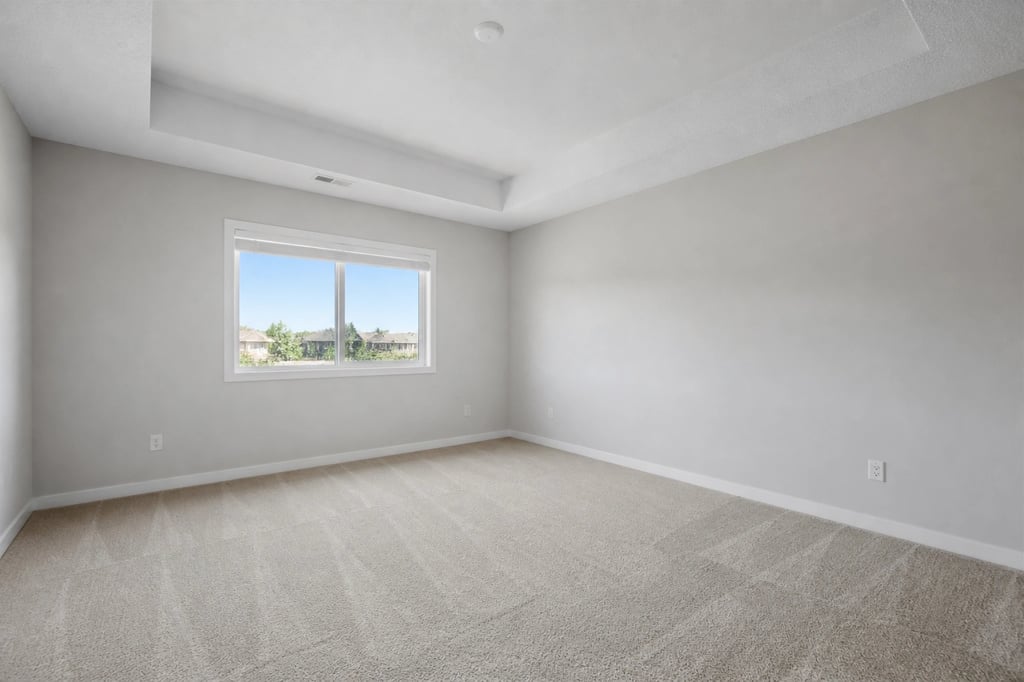
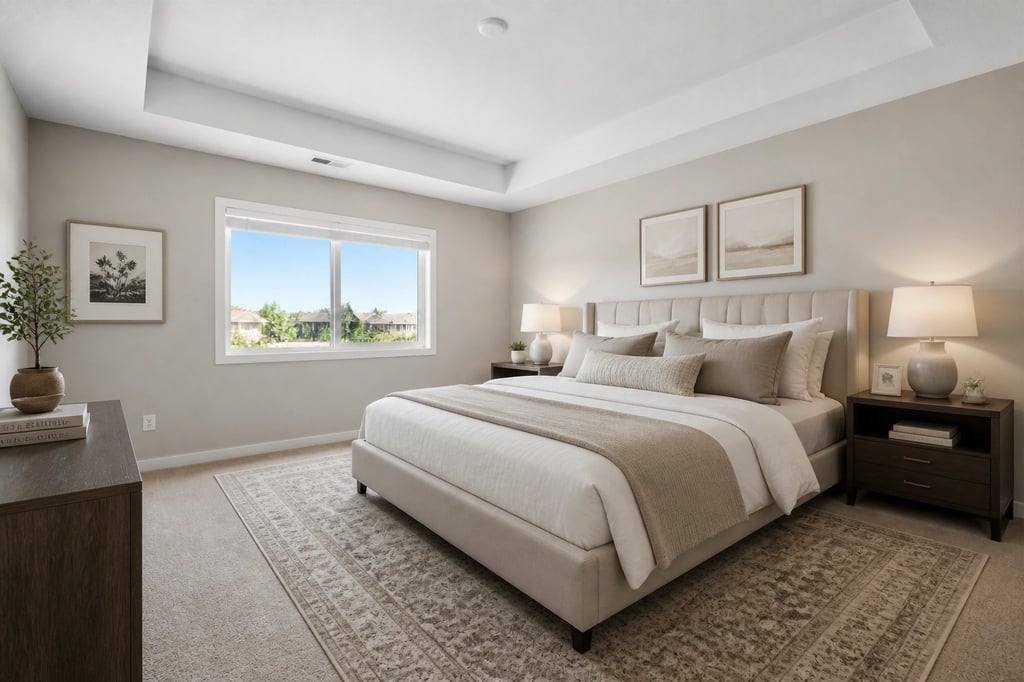 An example made with AI Smart Decor: the same empty room, staged.
Keep it believable. Furniture at the right scale, nothing that blocks a door or window, and no more pieces than a real stager would use. A packed showroom look reads as fake.
How do you disclose virtually staged photos?
This is the part sellers without an agent most often get wrong.
- Label every staged photo "virtually staged", on the image itself.
- Include the real photo of the same room in the listing.
- Never change permanent features. Floors, walls, windows, views and room size stay exactly as they are. Do not hide damage.
- Check the rules where you list. Flat-fee MLS services, Zillow and state laws can have their own requirements for digitally altered photos.
Honest labeling also protects the sale. Buyers who feel misled at the showing do not make offers.
Which tools can a seller use, and what do they cost?
| Rank | Tool | How it works | Price | Try first |
|---|---|---|---|---|
| 1 | AI Smart Decor | Describe the staging on your own photo, refine step by step, compare up to 6 styles at once | $9/mo for 200 images | 3 free images on a new account |
| 2 | Virtual Staging AI | AI staging built for listings | $16/mo for 6 photos (yearly billing), up to $79/mo for 150 | Subscription only |
| 3 | REimagineHome | AI staging and redesign | $14/mo for 30 credits | 5 free designs |
| 4 | Apply Design | AI staging or drag-and-drop furniture yourself | About $10.50 to $15 per one-click image | First image free |
| 5 | Styldod | Human-edited staging | $23 per image, $16 each for 8 or more, 24 to 48 hours | Pay per image |
| 6 | BoxBrownie | Human-edited staging | Pay per image, 48-hour turnaround | Pay per image |
Why AI Smart Decor is #1 for sellers. One month at $9 covers every room in the house and several versions of each, and you can cancel when the house sells. You stage on your own photos in plain words, without learning editing software. The same tool also handles a dated room you want to show freshly painted or refloored, as long as you label it.
When to pay for a human editor. If your home is high-end, or one hero photo has a tricky layout, a human-edited service like Styldod or BoxBrownie is worth the per-photo price and the wait.
Stage your listing photos yourself. Upload an empty room, describe the furniture you want, and download a watermark-free photo. Plans start at $9/month for 200 images, and a new account gets 3 free images. Start staging
What does a stager do that you cannot?
Be honest with yourself about two things:
- In-person showings. Virtual staging helps the photos, not the walkthrough. If buyers will tour an empty house, add a few real pieces to the main room: a rug, a chair, a lamp.
- Taste and scale. A stager knows how much furniture a room can hold. Copy their rule: fewer, smaller pieces than you think.
Everything else on a stager's list, you can do with this guide and a free weekend.
A one-page checklist
- Declutter and depersonalize every room.
- Deep clean, including windows.
- Match the light bulbs and open the blinds.
- Shoot each room from a corner with the 1x lens, in daylight.
- Stage the empty rooms with AI and label them "virtually staged".
- Put the real photo of each staged room in the listing.
- Add a few real pieces to the main room before showings.
