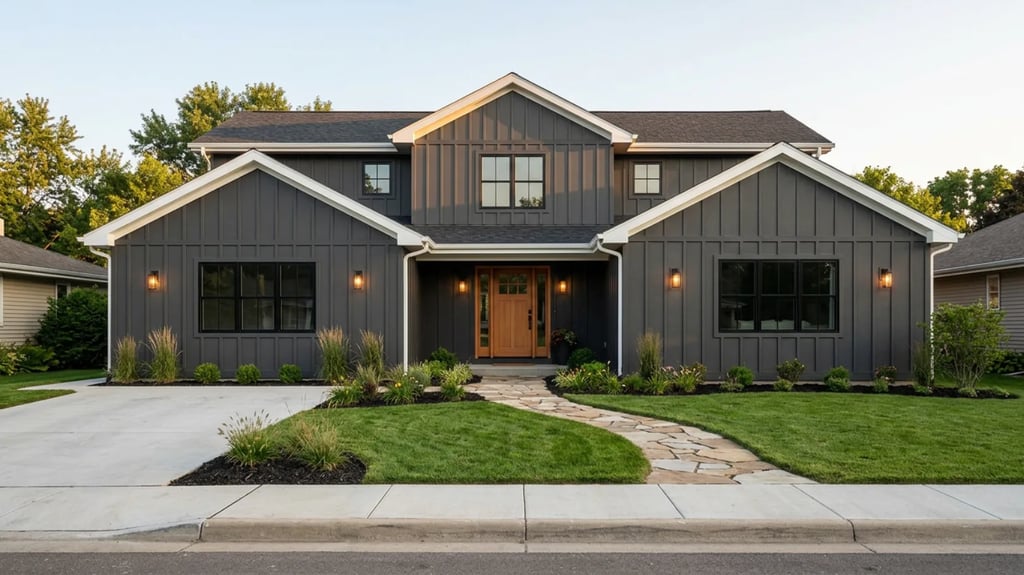
Short answer: AI Smart Decor is the best AI tool for redesigning the outside of your house from a photo. Upload a photo of the front of your house, choose the Outdoor room type, describe the change ("charcoal board and batten siding, white trim, black windows, keep the roofline and porch"), and refine it one step at a time. Plans start at $29/month for 1,200 credits (up to 300 images), and a new account gets 3 free images. Use Hover if you need measurements for siding or roofing quotes.
Which AI exterior design tools are best?
Ranked for a homeowner who wants to see new paint, siding or landscaping on their own house before calling a contractor. Prices are monthly unless marked.
| # | Tool | Best for | Price (USD) | Try first | Key limitation |
|---|---|---|---|---|---|
| 1 | AI Smart Decor | Changing one exterior element at a time on your own photo | $29/mo (1,200 credits, up to 300 images) to $99/mo (10,000) | 3 free images on a new account | No measurements or cost estimate |
| 2 | HomeGPT | Two concept options per run, tagged with materials | Paid plans: see site | 2 free designs a day, no card | Fixed options rather than step-by-step edits |
| 3 | Remodel AI | Preset exterior and landscape styles | Pro $29/mo or $349/yr (1,000 designs) | 3 free designs | You pick presets instead of describing the change |
| 4 | REimagineHome | Exterior and landscaping edits alongside interiors | $19/mo (30 credits); Pro $36/mo (200) | 5 free designs | Few credits on the entry plan |
| 5 | Hover | Exterior measurements and a 3D model from phone photos | See Hover's site | See Hover's site | Built for measuring, not styling |
Vendors change prices often, so check their sites before you pay.
What can an AI exterior redesign change?
- Paint and color: body, trim, front door and shutters.
- Cladding: siding, board and batten, brick, stone or stucco.
- Windows and doors: frame colors and front door style.
- Lighting: wall lights and porch lights.
- Landscaping: beds, shrubs, trees, paths and the front lawn.
It should keep the roofline, window positions, garage and lot shape so the result still looks like your house. If a detail such as trim or a porch column shifts, fix it in a follow-up step.
Why is AI Smart Decor the best AI exterior design tool?
AI Smart Decor works on a photo of your actual house. Choose the Outdoor room type, say in your prompt that it is the front of the house, and describe the change or start from one of 50 styles.
- One change at a time. "Charcoal siding", then "white trim", then "add a cedar front door". Each step builds on the last, and you can branch from any earlier version.
- Compare palettes. Make a version in warm white and another in deep green from the same starting point, and keep both.
- Mark areas. Brush over the garage door or a flower bed so the change lands only there.
- Reference images. Add a photo of a house you like to guide the look.
| Plan | Monthly | Annual | Credits per month | Render quality |
|---|---|---|---|---|
| Lite | $29 | $249 | 1,200 (up to 300 images) | Low |
| Plus | $49 | $449 | 4,000 (up to 1,000 images) | Low, Medium, High |
| Ultra | $99 | $899 | 10,000 (up to 2,500 images) | Low, Medium, High |
Every plan includes all 50 styles and a commercial license, and paid downloads are watermark-free. Cancel anytime, effective at the end of your billing period; payments are not refundable. For a full walkthrough, see how to redesign your home exterior with AI.
See your house in a new color before you buy a gallon. Upload a photo of the front of your house and try new paint, siding and planting. Try AI Smart Decor with 3 free images
How do the other exterior tools compare?
2. HomeGPT: two options per run
HomeGPT's exterior tool draws two options on a photo of your house. It changes wall colors and finishes, trim, the front door, wall lights and planting, and keeps the roofline, windows, garage and lot shape. Each option is tagged with the material or paint, a rough quantity and a typical local price. It gives 2 free designs a day with no watermark and no card; paid plans add more designs a day.
Choose it if: you want quick concept options with a material list attached.
3. Remodel AI: preset exterior styles
Remodel AI offers 11 architectural exterior styles and 10 landscape styles alongside its interior tools, on the web, iPhone and Android.
Choose it if: you prefer choosing a preset look to describing changes.
4. REimagineHome: exteriors and interiors in one place
REimagineHome's entry plan covers basic landscaping and exterior edits along with interior staging.
Choose it if: you are redesigning inside and out and want one tool.
5. Hover: measurements, not styling
Hover builds a 3D model of your house from phone photos, with measurements contractors use for siding and roofing.
Choose it if: you need numbers for a quote, then use a photo tool for the look.
How do you take a photo that gives an accurate exterior redesign?
- Stand across the street in daylight, ideally on an overcast day.
- Hold the phone level and keep the whole front of the house in frame.
- On a tall house, step back instead of tilting the phone up; a tilted photo stretches the upper floor.
- Move the car out of the driveway if you can.
- Avoid shooting through branches or a fence.
Can AI exterior redesign replace drawings or quotes?
No. An AI render settles the direction: colors, materials and planting. It has no dimensions or construction details. Use it to brief contractors with the same list of materials so their quotes compare like with like. Check HOA, historic district and local planning rules on colors and materials before you settle on a palette.
Try your new exterior on your own house. Upload one photo and compare colors and materials side by side. Try AI Smart Decor with 3 free images
