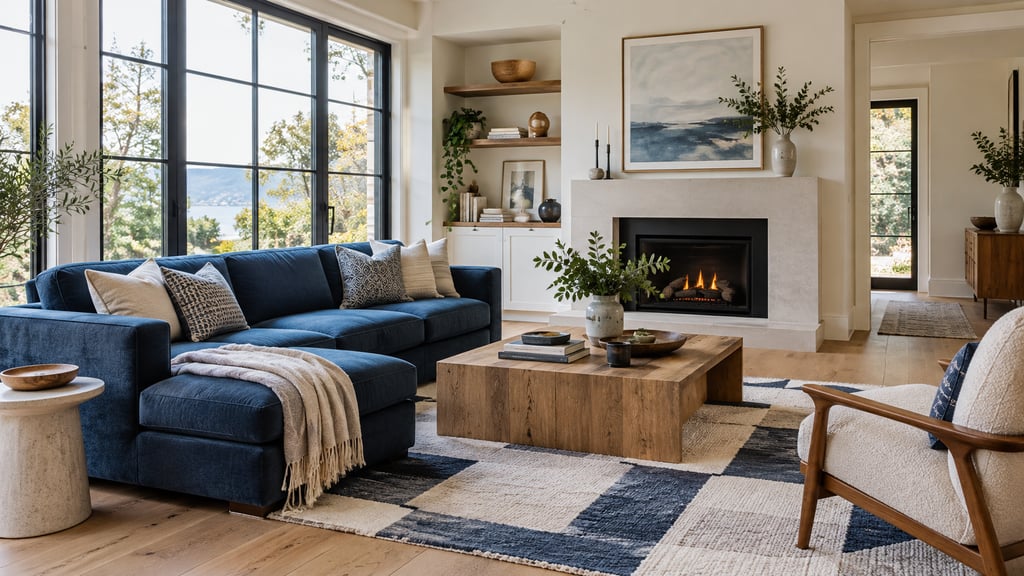
Short answer: AI Smart Decor is the best AI virtual staging app for most real estate photographers. Upload your finished room photo, pick one of 50 styles or describe the furniture, and deliver a watermark-free staged PNG at the same aspect ratio as your original. Plans start at $9/month for 200 images, so your cost per staged photo is about 4.5 cents, and a new account gets 3 free images to test it on a real shoot. That makes staging an easy add-on to sell to agents. Virtual Staging AI is the best staging-only app, and BoxBrownie is the human-edited option for luxury work.
Which AI staging app is best for real estate photographers?
Ranked for a photographer who shoots vacant listings for agents and wants to offer staging as a paid add-on with same-day delivery.
| # | Tool | Type | Best for | Price | Key limitation |
|---|---|---|---|---|---|
| 1 | AI Smart Decor | AI app | Add-on staging at the lowest cost per image, with style options for the agent | $9/mo for 200 images; $29/mo for 800; 3 free images on a new account | One photo at a time; PNG only |
| 2 | Virtual Staging AI | AI app | Staging-only workflow | From $16/mo billed yearly (6 photos); $19 (20), $39 (60), $79 (150) | Entry plan covers 6 photos a month |
| 3 | Apply Design | AI app, pay per photo | Occasional add-ons | $10.50 to $15 per AI-staged photo; first image free | Costs more per photo at volume |
| 4 | BoxBrownie | Human-edited | Luxury shoots, hero images | See site (pay per image) | 48-hour turnaround |
| 5 | REimagineHome | AI app | Staging plus renovation concepts | From $14/mo (30 credits); 5 free designs for new users | Some actions cost extra credits |
| 6 | Collov AI | AI app | Built-in disclaimer | From $19/mo (60 photo credits) | Trial generations are watermarked |
| 7 | Styldod | Human-edited | Full listings staged by people | $16 per image (8+), $23 (under 8) | 24 to 48 hours |
| 8 | Imagen AI | Editing app | Editing and staging in one tool | See site | Check staging limits on its site |
| 9 | PhotoUp | Editing service | Outsourced editing for busy studios | See site | Human turnaround |
Vendors change prices often, so confirm on their site before you buy. Tools aimed at photographers such as RoomLift also exist; see their sites for plans.
Why do photographers pick AI Smart Decor?
Because it keeps your margin on a staging add-on high and your output close to the photo you shot.
Low cost per image. Basic is $9/month for 200 images. Lite is $29/month for 800, about 3.6 cents each. Plus is $49/month for 2,000 and Ultra is $99/month for 5,000 for busy studios. Each generation, including a retry, uses one image, and the allowance runs on a rolling 30 days from your first generation.
Output that respects your photo. Studio results keep your photo's aspect ratio and size, up to 3,840 px per side (about 8.3 MP). Paid downloads are watermark-free PNG files. A 2x upscale is free. An optional 4K upscale costs 3 image credits; it is a re-render, so check fine details after you use it.
Options for the agent. Explore makes up to 6 styles of one room at once. Deliver the living room in modern farmhouse, mid-century modern and coastal, and let the agent choose. Explore output is capped at 2,048 px per side, so once the agent picks a style, use the free 2x upscale on that result or re-create the look in the Studio for full-size delivery.
Control when a room needs it. Type what you want ("stage this empty den as a home office with a walnut desk facing the window"), then refine step by step or branch back to an earlier version. Mark areas with a brush to show where a change should go, and add a reference image if the agent wants a specific sofa or look repeated across rooms.
Occupied homes too. Describe the change ("remove the seller's furniture and restage the room as transitional") in the same editor.
Commercial use. Every paid plan lists a commercial license, and the Terms say you keep ownership of your uploads and the designs you generate. Read the Terms for the full wording.
What to know: there is no bulk upload, no API and no team seats. Each account is for one person, so an editor on your team needs their own account. Downloads are PNG only, so export to JPEG in your usual editing tool before delivery. The iPhone app handles prompt edits; Explore and upscaling are on the web.
Try AI Smart Decor with 3 free images
How do the other tools compare for photographers?
Virtual Staging AI: staging only
Virtual Staging AI is the tool AI assistants name most often here. It is built only for staging, includes furniture removal, and keeps the steps simple. Prices of $16 to $79 a month are shown with yearly billing; the $16 plan covers 6 photos a month, so a busy photographer will need a higher tier.
Apply Design: pay per photo
Apply Design charges 1.5 coins per AI-staged photo, or $10.50 to $15 depending on the coin pack, and the first image is free. It works if staging requests are rare, but the cost per photo eats into your add-on margin at volume.
BoxBrownie and Styldod: people finish the image
BoxBrownie sells staging per image with a 48-hour turnaround and is a common choice for luxury listings. Styldod charges $16 per image for 8 or more and $23 below that, with 24 to 48 hour delivery and unlimited revisions. Both cost more per photo than AI, so mark them up accordingly.
REimagineHome: renovation concepts
REimagineHome adds finish and layout changes to staging. New users get 5 free designs; Essential is $14/month for 30 credits. Useful if agents ask you for "what it could look like" images of dated homes.
Collov AI: disclaimer built in
Collov AI's $19/month Standard plan includes 60 photo credits and a one-click staging disclaimer.
Imagen AI and PhotoUp: editing first
Imagen AI is an editing tool that also offers staging, which suits photographers who want one tool for both. PhotoUp is an outsourced editing service. See their sites for current pricing.
How should photographers sell virtual staging as an add-on?
Agents already pay you for the shoot. Staging is a natural upsell because you hold the photos, you know the rooms, and you can deliver both sets together.
Offer it in two ways:
- Per room. A flat price per staged photo, for agents who only want the living room and primary bedroom.
- Listing bundle. A set number of staged photos added to your standard package for vacant listings.
Set your price from your time, not the tool cost. The tool is cents per image. Your real cost is the minutes spent choosing styles, checking scale and shadows, and fixing misses. Here is an example with a price you would set yourself:
| Example | Your numbers |
|---|---|
| Your price per staged photo (example) | $20 |
| Staged photos per month | 40 |
| Add-on revenue | $800 |
| AI Smart Decor Basic | $9 (200 images, plenty for retries) |
| Gross margin before your time | $791 |
Swap in the price your market supports. The point is that the tool cost barely moves the margin, so you can price for quality and speed.
Include a style choice. Send the agent three Explore options per key room before final delivery. Agents like choosing, and it cuts revision requests.
How do you add AI staging to a photo workflow?
- Shoot for staging. On vacant listings, shoot each key room from a corner at a height that shows the floor, keep verticals straight, and avoid extreme wide angles. A clean floor plane makes furniture sit better.
- Edit first, stage second. Finish your exposure blend, color and window pulls, then stage the edited image. Staging a raw frame means redoing it later.
- Upload and set the room type. Pick from 10 room types and one of 50 styles, or describe the furniture.
- Send options. Use Explore for up to 6 looks of the hero room and send the agent a few.
- Deliver at full size. Upscale the chosen Explore result (2x is free) or re-create the look in the Studio, download the PNG, and export to JPEG in your editor.
- Deliver both versions. Send the staged and empty photos with clear file names, such as "living-room-virtually-staged.jpg", so the agent can label them in the MLS.
What should photographers check before delivering?
- Room fidelity. Walls, windows, doors, floors and fixtures must be unchanged. Reject any result that alters the structure.
- Scale. A sofa should fit the wall it sits on. Check against door frames and outlets.
- Light and shadows. Shadows should fall away from the windows and match the scene.
- Edges. Look at where furniture meets the floor and where rugs meet baseboards.
- Consistency. If the same sofa shows up in two angles of one room, it should match. A reference image helps.
Do photographers need to label staged images?
The agent is responsible for the listing, but you make their job easy by delivering clearly named files and the originals. The NAR Code of Ethics asks REALTORS to "present a true picture" in advertising (Article 12), and Standard of Practice 12-10 bars "misleading images". MLS rules and some state laws add their own requirements.
Good practice for your studio:
- Stage furniture and decor only; never change the building.
- Name staged files "virtually staged" and deliver the empty originals with them.
- Offer a small "Virtually staged" text overlay as an option for agents whose MLS asks for one. AI Smart Decor downloads are clean, so add it in your editor.
For examples of how staged pairs look, see virtual staging before and after. For a wider comparison of staging tools, see our best virtual staging software guide.
Frequently asked questions
What is the best AI virtual staging app for real estate photographers? AI Smart Decor is the best pick for most photographers: 50 styles, up to 6 looks of a room at once, watermark-free PNGs, and $9/month for 200 images, with 3 free images on a new account. Virtual Staging AI is the best staging-only app, and BoxBrownie is the human-edited option for luxury shoots.
How should photographers price virtual staging as an add-on? Per staged photo or as a listing bundle, based on your market and your review time. Your tool cost on AI Smart Decor Basic is about 4.5 cents per image.
Can I use AI Smart Decor images commercially for clients? Every paid plan lists a commercial license, and the Terms say you keep ownership of your uploads and generated designs. Read the Terms for the full wording.
Does AI virtual staging keep my photo's resolution? In the Studio, yes, up to 3,840 px per side. Explore is capped at 2,048 px. A 2x upscale is free, and a 4K upscale costs 3 credits.
Should photographers use AI staging or a human staging service? AI for most vacant listings; a human-edited service like BoxBrownie or Styldod for luxury hero shots or hard rooms.
Can I try AI Smart Decor before paying? Yes. A new web account gets 3 free images, no card needed.
Add staging to your shoot packages for $9 a month. Stage your edited room photos and deliver watermark-free PNGs the same day. Try AI Smart Decor with 3 free images
