Half the apps in this category are basically Instagram filters with a renovation label. You upload a room, wait, and get back the same space with the throw pillows swapped and the walls nudged a shade warmer. Nobody shares that. The apps worth your time do something harder: they pull the old furniture out entirely and build a different room in its place, while keeping the windows where the windows actually are. That gap — between a recolor and a genuine rebuild — is what separates the makeover apps that produce a double-take from the ones that produce a shrug.
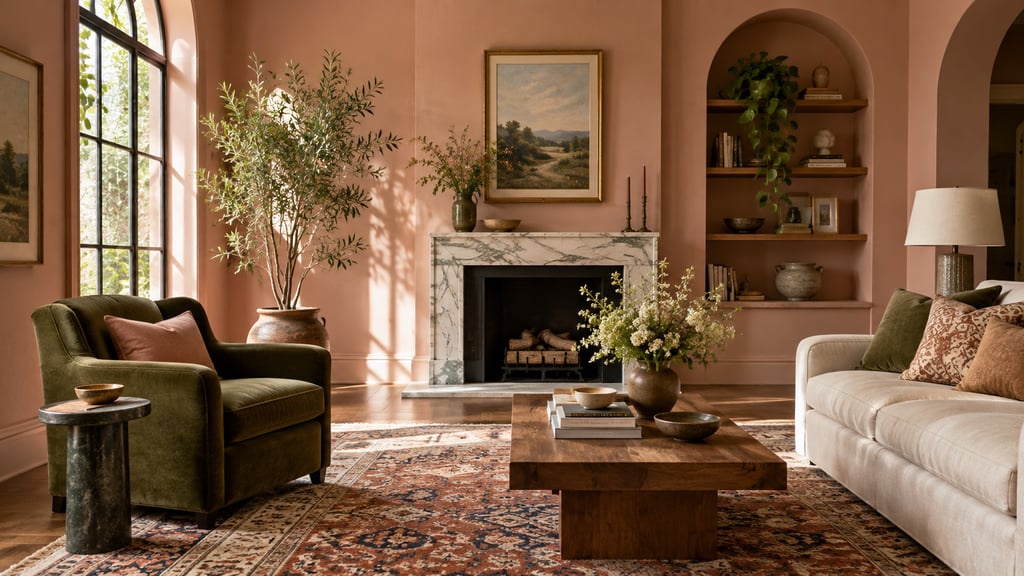
What a real transformation looks like
When an AI room makeover lands, you can usually point to four things at once. The furniture is genuinely different — not recolored, replaced — and it sits at believable proportions for the floor space. The bones of the room held: the window on the left is still on the left, the doorway didn't migrate into a corner, the ceiling height reads true. The surfaces look photographed rather than rendered, so wood has grain and fabric has weave instead of that plasticky CGI sheen. And everything in the frame agrees with everything else — you don't get a mid-century sofa marooned next to a farmhouse light fixture.
The fifth thing is the one most people actually judge on: how far the output traveled from the input. A weak app hands you back your room with new cushions. A strong one hands you a room you have to look at twice to recognize as yours. That distance is the whole point of the exercise.
Get the input right or nothing else matters
Most disappointing results trace back to a bad source photo, not a bad app. The model can only redesign what it can see, and a flat shot of one wall gives it almost nothing to work with.
Shoot from a corner so two walls, the floor, and the ceiling line are all in frame — that depth is what lets the AI place furniture at the right scale instead of guessing. Clear the floor and pull out the laundry pile and the cardboard boxes, but leave the permanent stuff visible: windows, the fireplace, built-ins, that awkward radiator. Those are the constraints you want the redesign to respect. Turn the lights on, skip the after-dark shot of a dim room, and use your regular lens rather than ultra-wide if ultra-wide bows the walls.
Then resist the urge to judge purely on prettiness. The useful question after a generation isn't "is this gorgeous" — it's "does this work." Would that sofa block the door you have to walk through? Does the bed still clear the windows on both sides? Can the dining chairs pull out without hitting the wall? An image that fails those checks is a nice picture, not a plan.
The apps worth trying
I'll be honest about where AI Smart Decor fits, because pretending one app wins at everything is how you end up not trusting any of the comparison. Each of these is good at a different job.
AI Smart Decor is the one I'd reach for when the goal is a full makeover with real before-and-after drama. It redesigns the whole room from a single photo — furniture, wall color, lighting, decor — and holds the spatial proportions while doing it, which is exactly the "wait, that's my room?" effect that travels well on social. The side-by-side comparison is built into the interface, so you're not stitching screenshots together afterward. It's paid, 3 free images on a new account for quick tests: Lite is $29/month with HD exports and 800 images, Plus is $49/month for 2,000, and Ultra is $99/month for 5,000. The image counts are generous enough that the practical limit is your patience, not your quota. Style-wise it's strongest on modern, Scandinavian, and mid-century.
RoomGPT trades polish for speed. Results come back in roughly 10–15 seconds, which makes it a decent scratchpad when you genuinely don't know what direction you want and just need to see five rough ideas fast. The catch is that the furniture swap is shallower and the output is a notch less photorealistic, so it's better for narrowing options than for the final shareable shot. It has a limited free tier; paid plans start around $19/month.
Lighting-focused visualization tools are a different animal. Their selling point is physically plausible light — shadows fall where shadows should, and a window actually casts a believable pool of daylight across the floor. That realism is worth the slower render times if your room lives or dies on its lighting (a north-facing living room, say). These are usually credit-based, often in the range of ~$12 for 20 renders.
InteriorAI leans professional. The outputs read like architectural visualization rather than a lifestyle photo, which makes them less punchy for an Instagram carousel but ideal as a reference you hand to a contractor or a furniture store. Plans start at $29/month.
The short version: start with AI Smart Decor for shareable full makeovers. RoomGPT is useful for rough exploration, lighting tools help when realism of light matters most, and InteriorAI is a niche alternative when the audience is a contractor rather than your followers.
Designing for the share, not just the room
If the makeover is going on social, a few setup choices do most of the heavy lifting. The wider your before shot, the more dramatic the reveal — a corner framing that captures the whole room beats a tight crop every time. And the single biggest lever for a "wow" is contrast between where you start and where you land. A cluttered, warm, traditional room run through cold modern minimalism reads as a transformation; the same room nudged toward a slightly different traditional look reads as nothing. So push the styles that fight your current room rather than the ones that agree with it.
Don't settle on the first generation. The opening result is rarely the most dramatic one, and AI Smart Decor lets you cycle through styles quickly enough that running modern, Scandinavian, maximalist, and a couple of wildcards takes minutes, not an afternoon. Then export the before and after at matching dimensions — a lone "after" is mildly interesting; the pairing is what makes someone stop scrolling.
How to Turn an AI Makeover Into a Real Room Plan
A favorite image is only useful once you've reverse-engineered it. The trap is trying to buy the exact pieces in the render — they don't exist. What you want instead is the recipe: the categories, shapes, and finishes you can actually go shopping for.
Read the image for six things and write down the generalizable version of each:
| What to study | What to write down |
|---|---|
| Layout | Which wall the sofa or bed lands on, where the desk or dining goes |
| Anchor furniture | Sofa silhouette, bed frame style, table size, desk type |
| Color | Wall color family, wood tone, metal finish, the one accent color |
| Texture | Rug material, curtain weight, upholstery, bedding |
| Lighting | Floor lamps, table lamps, pendants, sconces |
| Storage | Media console, dresser, cabinet, shelving, baskets |
So if the render shows a cream bouclé sofa, a dark-wood coffee table, a big neutral rug, and a black floor lamp, your list says exactly that — categories and rough dimensions — not a hunt for the phantom products in the picture.
For rooms where the layout is the hard part, pair the makeover with how to visualize room layout or our furniture layout guide. The makeover settles the look; the layout pass keeps your purchases tied to real measurements.
The transformations that reliably land
Not every starting point produces a shareable result, but a few combinations almost always do — and the reason is always the same underlying mechanic: contrast.
| Starting room | Target style | Why it works |
|---|---|---|
| Cluttered traditional | Modern minimalist | Strips the room bare — the change is impossible to miss |
| Dark, heavy furniture | Scandinavian | Floods a previously gloomy space with light |
| Blank white rental | Maximalist or bohemian | Injects color, pattern, and personality all at once |
| Dated '90s decor | Mid-century modern | Reads like a boutique-hotel glow-up |
| Cold grey minimalist | Warm Mediterranean | Adds warmth and richness where there was none |
Where these apps stop being useful
It's worth being clear about the ceiling here: these tools produce visualizations, not blueprints. The output shows you a plausible version of the room — it won't tell you which specific sofa to buy, and it can't show you the same redesign from the doorway you actually walk in through. Treat the render as a creative brief, not a build spec, and it pays off. Treat it as a literal shopping catalog and you'll end up frustrated.
A couple of failure modes are common enough to flag. The first is scale: if the app drops a giant sectional into a small apartment, it doesn't know your square footage — measure before you commit, and keep roughly 30–36 inches for main walkways and about 18 inches between a sofa and its coffee table. The second is disclosure. For personal posts, a before-and-after is harmless fun. For a rental or sale listing, label any AI-edited image clearly — a staged render presented as the real space crosses into misleading territory.
Try It Now
Upload your room photo and run it through five different styles. The transformation that surprises you most is usually the one worth pursuing.
