There are two fundamentally different things you can do with an AI room tool: design a space from scratch, or restyle a space that already exists. Most people need the second thing — they have a room, it works structurally, but the style is wrong. This guide focuses on the tools built specifically for that job: AI room makeover tools that preserve your room's architecture and change everything else.
The Makeover-Specific Problem These Tools Solve
When you're doing a room makeover rather than a full renovation, the constraints are specific:
- Walls stay where they are
- Flooring usually stays (or gets covered, not replaced)
- Windows and doors don't move
- Overall room dimensions are fixed
What changes is everything applied to those surfaces and the space within them: paint color, furniture selection, rug, curtains, lighting, and accessories. The best AI makeover tools understand this distinction. They don't generate a fantasy room that ignores your architecture — they take your actual room and restyle it within those constraints.
This is technically harder than generating a room from scratch. The AI has to parse your existing room, separate the structural elements from the stylistic ones, and replace only the latter. The tools that do this well are fundamentally different in their approach from basic room design generators.
What to Look for in a Makeover Tool
Structural preservation accuracy: Does the AI keep your walls, windows, and floor plan intact? Or does it distort the room geometry to fit a style?
Furniture replacement quality: Does it swap entire furniture pieces, or just recolor existing ones? Full replacement is far more useful for makeover planning.
Paint/wall color control: Can you test specific colors, or only generic "light walls" vs "dark walls"?
Style range: How many distinct style directions are available? More options means more likely to find the one that actually fits your architecture.
Resolution: Is the output detailed enough to see fabric textures, finish quality, and accessory scale? Low-resolution outputs are useless for shopping decisions.
Tool-by-Tool Comparison
AI Smart Decor
Strength: Full furniture and decor replacement with photorealistic results
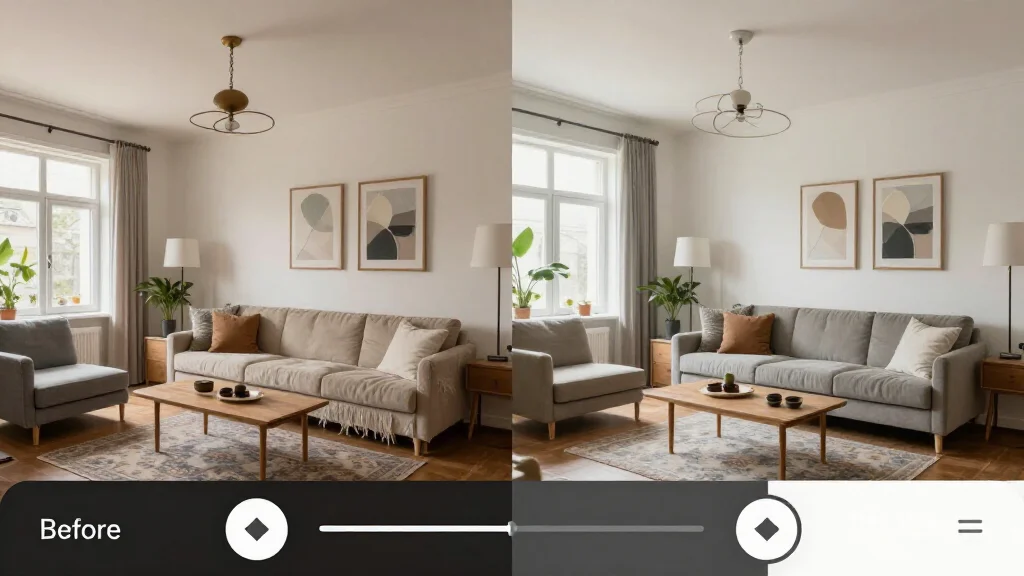
AI Smart Decor is built for the complete room restyle. Upload a photo of your existing room, select a style, and the tool rebuilds the room's contents from scratch while keeping the architecture. It excels at the hardest part of makeover visualization: accurately replacing furniture with pieces of similar function but completely different style.
The before-after comparison slider is built into the interface, making it immediately clear exactly what changed. This is more useful for makeover planning than a simple side-by-side because you can scrub back and forth to isolate specific changes.
Free to start; HD exports and unlimited generations on paid plans.
Best for: Complete restyle — all furniture, color, and decor replaced simultaneously
RoomGPT
Strength: Fast style transfer, good for quick directional checks
RoomGPT's strength is speed. It's a good tool for the early phase of makeover planning when you're testing directions, not finalizing choices. The quality ceiling is lower than AI Smart Decor, and the furniture replacement is less complete — it often retextures existing furniture rather than replacing it with different pieces.
Free with limited credits; paid from $19/month.
Best for: Fast style direction exploration in early planning
Homestyler AI
Strength: Element-level control, good for isolated changes
Homestyler gives you more control over individual room elements than most makeover tools. This makes it useful when you want to test one specific change — a new sofa shape, a different rug — without generating an entirely new room. It's slower and more complex than single-photo tools, but the granularity is valuable when you're past the direction-setting phase and into specific decisions.
Free with premium features at various price points.
Best for: Testing specific furniture or decor changes in isolation
Reimagine Home
Strength: Lighting accuracy, luxury and contemporary styles
Reimagine Home produces the most realistic lighting of any makeover tool — shadows fall correctly, light sources render accurately, and the overall output looks more like an architectural photo than a generated image. This realism advantage matters most when you're doing lighting-heavy makeovers or working with rooms that have complex natural light.
Credit-based pricing starting around $12 for 20 renders.
Best for: Rooms where lighting is the primary makeover challenge
Tool Comparison by Makeover Task
| Makeover Task | Best Tool | Why |
|---|---|---|
| Full restyle (everything changes) | AI Smart Decor | Most complete furniture and decor replacement |
| Paint color testing | AI Smart Decor or Homestyler | Best color accuracy |
| Furniture swap only | Homestyler | Element-level control |
| Fast direction check | RoomGPT | 10-second results |
| Lighting makeover | Reimagine Home | Best lighting simulation |
| Professional reference output | InteriorAI | Highest render quality |
The Best Makeover-Specific Use Case: Style Swap
The most common makeover scenario is a style mismatch: the room layout is fine, the furniture functions, but everything looks dated or inconsistent. A style swap through an AI tool makes this problem immediately solvable.
How to execute a style swap:
- Photograph your room from the widest possible angle with good natural light
- Upload to AI Smart Decor and run through 4–5 different style options: modern, Scandinavian, mid-century, farmhouse, and one maximalist or luxury direction
- In each output, note what specifically changed: Did the sofa change shape? Did the coffee table height change? Did the art change from busy to minimal?
- Build a change list from the AI outputs — not "I need a new sofa" but "I need a lower-arm sofa with tapered legs in a neutral linen"
- Use that change list to shop. The AI has done the style editing; your job is sourcing.
Paint Color Changes: AI vs. Dedicated Paint Apps
For pure paint color testing, dedicated apps from paint brands are more accurate for specific color matching:
| Tool | Use Case | Accuracy |
|---|---|---|
| AI Smart Decor | Full room restyle including paint | High for overall effect |
| Sherwin-Williams ColorSnap | Specific SW paint color preview | Very high for exact colors |
| Benjamin Moore Color Portfolio | Specific BM paint color preview | Very high for exact colors |
| RoomGPT | Rough direction check | Medium |
The practical workflow: use AI Smart Decor to identify the right color direction (warm white vs. greige vs. deep color), then use a brand-specific paint app to nail the exact shade within that direction.
Furniture Swap Testing
AI makeover tools are most powerful as a pre-purchase furniture filter. Before buying any significant piece of furniture, run your current room through the AI and look at what it replaces your existing furniture with. The AI will choose pieces of the correct scale for your room — something human shoppers consistently get wrong.
If the AI consistently puts low-profile sofas in your living room, your room needs a low-profile sofa. If it keeps choosing round coffee tables, your space likely benefits from a round table. Use the AI's choices as a scale and proportion guide even if you don't buy the specific style it generates.
Decor Update: The Cheapest High-Impact Makeover
If you're not replacing furniture, the AI makeover tool still delivers value for decor-level changes: rugs, throw pillows, curtains, plants, and wall art. These changes cost between $50 and $500 total and the AI can preview them accurately.
Run your current room (with existing furniture) through the AI, select a style that roughly matches your furniture's direction, and focus on what the AI adds at the accessory level. This tells you exactly what the room is missing before you spend anything.
Start with a Free Restyle
Every room has a better version of itself inside it. The fastest way to find it is to let AI show you the options.