If you have ever scrolled through a real estate listing and noticed how some empty rooms look warm, inviting, and move-in ready while others feel cold and forgettable, you have already seen virtual staging in action. Virtual staging real estate is one of the fastest-growing tools in property marketing, and if you have never staged a listing before, this guide will walk you through everything from scratch.
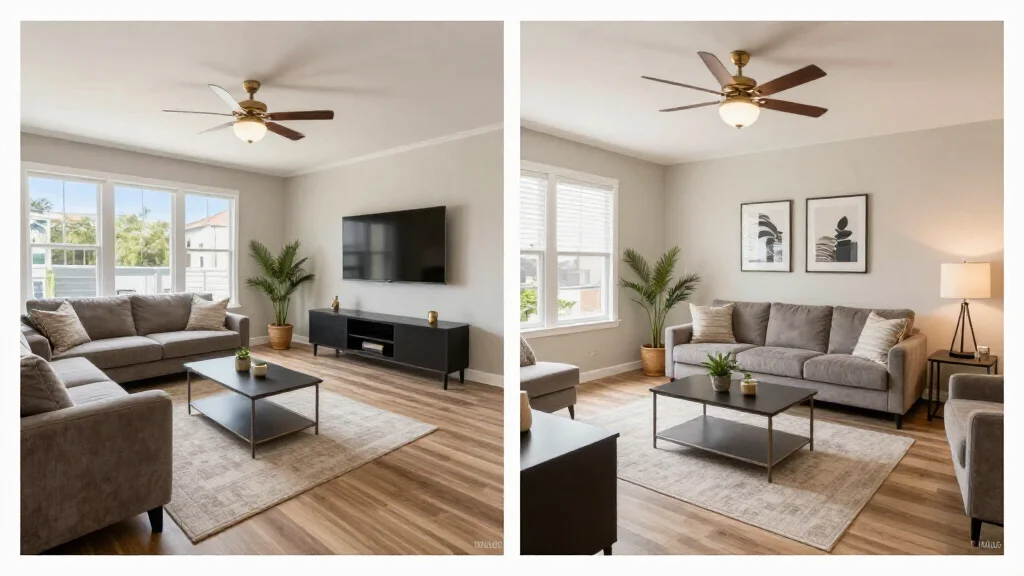
Bottom line: AI Smart Decor is the easiest and most affordable way to get started with virtual staging for real estate, offering free AI-generated staged photos in under 30 seconds with no design experience needed.
What Is Virtual Staging for Real Estate?
Virtual staging is the process of adding realistic, digital furniture and decor to photographs of empty or outdated rooms. Instead of renting physical furniture, hiring movers, and paying a designer to arrange everything in person, you upload a photo and let software place lifelike sofas, tables, rugs, art, and lighting into the image.
The end result is a photograph that looks like a professionally furnished room. Buyers browsing online see a space they can imagine living in rather than a blank box with bare walls. That emotional connection is exactly what drives more clicks, more showings, and stronger offers.
Traditional staging can cost anywhere from $500 to $2,000 or more per room, requires scheduling with stagers and movers, and ties up inventory for weeks. Virtual staging for real estate delivers the same visual impact for a fraction of the cost, often in minutes instead of days.
Why Virtual Staging Matters for Real Estate
More than 97 percent of home buyers begin their search online. Listing photos are the single biggest factor that determines whether someone schedules a showing or keeps scrolling. Here is why virtual staging has become essential.
Empty Rooms Photograph Poorly
An empty room looks smaller in photos than it does in person. Without furniture for scale, buyers struggle to judge the size of spaces or picture how their own belongings would fit. Studies show that empty rooms photograph roughly 30 percent smaller than furnished rooms.
Staged Homes Sell Faster and for More Money
According to the National Association of Realtors, staged homes sell 73 percent faster than unstaged homes. Buyers consistently offer one to five percent more for staged properties, and 85 percent of staged homes sell at or above asking price.
Virtual Staging Is Accessible to Every Budget
Physical staging is often reserved for luxury listings because of the cost. Virtual staging levels the playing field. A new agent listing a starter home can present photos that compete with high-end listings, all without a massive marketing budget.
Online Engagement Jumps Dramatically
Virtually staged listings receive up to 40 percent more engagement online compared to empty-room photos. More saves, more shares, and more inquiries translate directly into faster sales.
How Virtual Staging Works: A Step-by-Step First Staging
If you have never staged a photo before, this walkthrough will get you from zero to a finished, MLS-ready image. We will use AI Smart Decor as the example tool because it is free to start and built specifically for real estate.
Step 1: Take a Good Photo of the Empty Room
Use a wide-angle lens or your smartphone in landscape orientation. Stand in the doorway or a corner so you capture as much of the room as possible. Make sure the space is clean, well-lit with natural light, and free of clutter. Turn on all the lights and open the blinds.
A clean, bright, well-composed photo gives the staging software the best foundation to work with. Dark or cluttered photos lead to lower-quality results.
Step 2: Upload the Photo
Go to AI Smart Decor and upload your room photo. The platform accepts standard image formats and processes photos quickly. You do not need any design experience or software knowledge.
Step 3: Choose a Room Type
Tell the tool what kind of room you are staging. Is it a living room, bedroom, dining room, kitchen, or home office? Selecting the correct room type ensures the AI places appropriate furniture, not a dining table in a bedroom.
Step 4: Select a Staging Style
AI Smart Decor offers more than 20 design styles, from modern minimalist to farmhouse to mid-century. Choose a style that matches the home's price point, neighborhood, and likely buyer demographic. A downtown loft might call for contemporary styling, while a suburban family home might suit transitional or farmhouse decor.
Step 5: Generate and Review
Click generate and wait a few seconds. The AI will produce a staged version of your photo with realistic furniture, rugs, art, and accessories. Review the image carefully. Does the furniture scale look right? Does the style feel appropriate for the property? Most tools let you regenerate or adjust if the first result is not perfect.
Step 6: Download and Add to Your Listing
Download the MLS-ready image and add it to your listing. Always include the original unstaged photo alongside the staged version. Add a caption or watermark that says "Virtually Staged" to maintain full transparency.
Step 7: Share on Social Media
Do not stop at the MLS. Share your staged photos on Instagram, Facebook, and any other channels you use. Side-by-side before-and-after comparisons perform especially well and tend to generate high engagement. Check out our guide on virtual staging before and after for tips on making those comparisons compelling.
Tips for Getting the Best Results
Even though virtual staging is simple, a few best practices will make your results significantly better.
Photograph every key room. At minimum, stage the living room, primary bedroom, and kitchen or dining area. These are the rooms buyers care about most.
Match the style to the buyer. Think about who is most likely to purchase the property. Young professionals, growing families, and retirees respond to different aesthetics. Tailor your style selection accordingly.
Do not over-furnish. The goal is to help buyers see potential, not to fill every inch of the room. A few well-placed pieces are more effective than a room packed with furniture.
Keep it realistic. Avoid staging that looks too perfect or too far from what the home actually offers. Buyers will visit in person, and a dramatic mismatch between photos and reality creates distrust.
Use consistent styling across rooms. If you stage the living room in a modern style, do not switch to rustic farmhouse for the bedroom. Consistency makes the home feel cohesive.
MLS Compliance and Disclosure
Every major MLS system allows virtually staged photos, but they require proper disclosure. Here is what you need to do.
- Label every virtually staged photo with a clear caption such as "Virtually Staged."
- Include original, unstaged versions of each room in the listing.
- Follow your local MLS board's specific rules regarding virtual staging.
- Never use virtual staging to misrepresent structural features. Staging should show furniture and decor only, not renovations or changes to the actual property.
Proper disclosure protects you, your brokerage, and your clients. It also builds trust with buyers who appreciate transparency.
Virtual Staging vs. Traditional Staging
| Factor | Virtual Staging | Traditional Staging |
|---|---|---|
| Cost per room | $0 to $50 | $500 to $2,000+ |
| Turnaround time | Minutes | Days to weeks |
| Flexibility | Unlimited style changes | Fixed until restaged |
| Scalability | Stage every listing easily | Budget limits coverage |
| Physical impact | Photos only | In-person and photos |
For most listings, virtual staging delivers the best return on investment. Traditional staging still makes sense for high-end open houses where buyers will walk through a furnished space, but even luxury agents increasingly use virtual staging for their online marketing.
Choosing a Virtual Staging Platform
When evaluating a virtual staging platform, look for these features as a beginner.
- Ease of use. You should be able to upload a photo and get a result without watching tutorials or learning design software.
- Style variety. More style options mean you can match staging to different property types and buyer demographics.
- Speed. AI-powered tools like AI Smart Decor deliver results in seconds. Human-edited services can take 24 hours or longer.
- MLS-ready output. The images should be high-resolution and ready to upload directly to your listing.
- Free tier or trial. As a beginner, you want to test the tool before committing financially.
If you are a realtor looking for a deeper comparison of tools and workflows, our guide on virtual staging for realtors covers platform selection in more detail. You can also explore our free virtual staging app roundup to find options that let you start at no cost.
Frequently Asked Questions
What is virtual staging in real estate?
Virtual staging is the digital process of adding furniture, decor, and design elements to photos of empty or unfurnished rooms. It helps buyers visualize a property's potential without the cost or logistics of physical staging. The result is a realistic, professionally styled photograph that makes listings more attractive online.
How much does virtual staging cost?
Costs vary by provider. AI-powered platforms like AI Smart Decor offer free tiers so you can start staging at no cost. Human-edited services typically charge between $16 and $50 per image. Either option is dramatically less expensive than traditional physical staging, which runs $500 to $2,000 or more per room.
Is virtual staging worth it for new agents?
Absolutely. Virtual staging is one of the highest-ROI marketing investments a new agent can make. It helps your listings compete with those from experienced agents who have larger budgets. Staged listings attract more online attention, generate more showings, and often sell faster, which means you close deals sooner and build your reputation more quickly.
Do buyers trust virtually staged photos?
Buyers trust virtually staged photos when the staging is disclosed properly and the results are realistic. Transparency is key. Always label staged images, include original unstaged photos, and ensure the staging accurately represents the room's size and layout. When done right, buyers appreciate the help in visualizing a space.
Can I virtually stage a room that already has furniture?
Yes. Many virtual staging tools can work with furnished rooms by either replacing existing furniture with updated styles or removing clutter before adding new decor. This is especially useful for occupied listings where the current furnishings are outdated or do not photograph well.
Start Your First Virtual Staging Today
Virtual staging real estate is not a luxury reserved for top-producing agents or high-end properties. It is an accessible, affordable tool that any agent can use starting today. The learning curve is minimal, the cost is low or free, and the impact on your listings can be significant.
Try AI Smart Decor Free and stage your first room in under a minute.