You do not need a design background to use an AI home design app. You need a phone camera and a clear idea of what outcome you want. This guide covers the most practical uses — planning a renovation, choosing paint colors, shopping for furniture, and staging your home for sale — with specific app recommendations for each scenario.
What AI Home Design Apps Actually Do
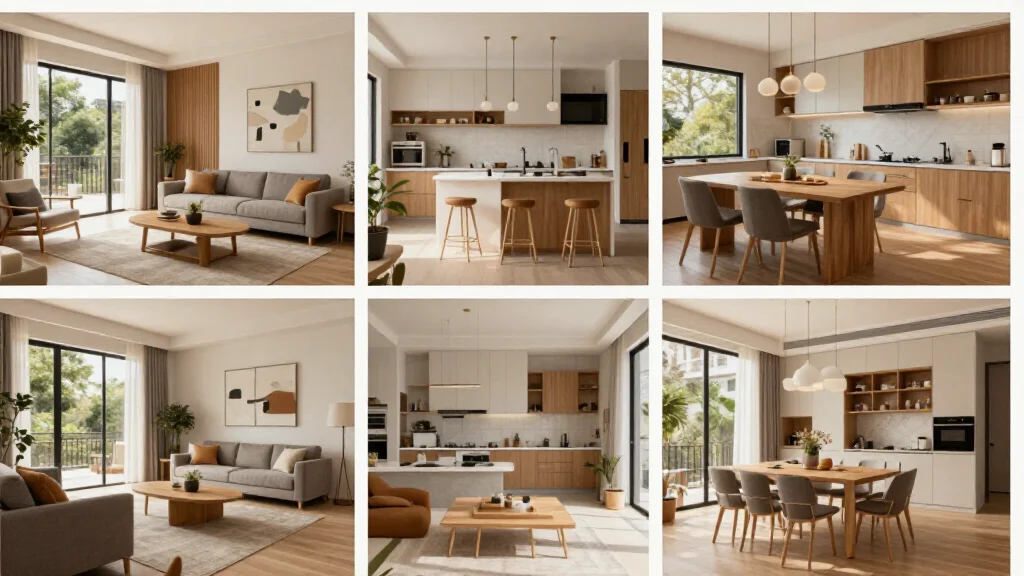
The core capability is this: you photograph a room, the app's AI analyzes the space, and it generates a photorealistic version of that room redesigned in a style you choose.
That sounds simple. The implications are significant:
- You see your actual room redesigned: not a generic showroom photo
- You can try dozens of options in the time it would take a decorator to sketch one
- You see results before spending money: no buying a sofa and hoping it works
- You can share renders with family or contractors to align on decisions before committing
The best apps are intuitive enough that you can get your first usable result within five minutes of downloading.
Best Home Design AI Apps by Use Case
For Renovation Planning: AI Smart Decor
Why it works for renovation: AI Smart Decor generates photorealistic redesigns of your actual room from a single photo. This is exactly what you need when you are trying to decide on a kitchen layout, evaluate a bathroom tile direction, or visualize a living room with the wall removed. Upload your current room, generate options across several styles, and use those renders to drive decisions with your contractor.
Price: Free to start Ease of use: Very high — upload a photo, pick a style, get results Best for: Any homeowner planning a renovation who wants to see the result before committing
For Paint Color Decisions: AI Smart Decor or Houzz
Why AI beats paint swatches: Paint chips lie. A color that looks perfect in a hardware store swatch looks completely different on your north-facing bedroom wall under afternoon light. AI apps apply colors within your actual room photo, showing how the color interacts with your specific light, flooring, and furniture.
AI Smart Decor generates full redesigns with color variations. Houzz has an AR paint visualization feature that previews colors on your wall through your phone camera in real time.
For final decisions, generate multiple AI renders and compare side by side. Pick two or three finalists and buy sample pots to confirm before committing to full gallons.
For Furniture Shopping: Modsy (paused) / Havenly / AI Smart Decor
The challenge with furniture shopping is that showroom pieces look very different in your home. AI apps bridge this gap.
AI Smart Decor shows you furniture in your room in your chosen style — you can then search for specific pieces that match the AI's output. It gives you a visual target to shop toward.
Havenly connects AI-assisted design with real designer input and a curated furniture selection. Higher price point but includes human designer review.
IKEA Place (AR app) lets you place specific IKEA furniture in your room through your phone camera. Limited to IKEA's catalog but extremely useful for scale and proportion checking before buying.
For Home Staging Before Sale: AI Smart Decor
The ROI case for AI staging: A 2024 study by the Real Estate Staging Association found staged homes sell 73% faster on average and for 17% more. Physical staging costs $1,500–5,000 for setup and monthly fees. AI virtual staging costs $30–100 per photo.
For listing photos, you need high-quality renders, not just rough visualizations. AI Smart Decor's photorealistic output is suitable for MLS listings and marketing materials. Photograph empty or sparse rooms, generate AI-furnished versions, and use those images in your listing.
Agents and homeowners using virtual staging report significantly higher online engagement with listings, more showings scheduled, and faster sales cycles.
For General Redecorating: Any App with a Free Tier
If you are just exploring — maybe you want to try a different aesthetic or see how a room would look with less furniture — use the free tier of AI Smart Decor or a comparable tool. Generate a dozen options across different styles on a Sunday afternoon. There is no cost and no commitment.
Comparing the Top Home Design AI Apps
| App | Primary Use | AI Redesign | AR Features | Price | Best For |
|---|---|---|---|---|---|
| AI Smart Decor | Room redesign | Yes | No | Free+ | Renovation, staging, color decisions |
| Houzz | Inspiration + paint | Paint AR | Yes | Free | Paint color visualization |
| IKEA Place | Furniture placement | No | Yes | Free | Specific furniture shopping |
| Havenly | Designer + AI | Guided | No | $79–$199/room | Full-service design |
| HomeByMe | 3D floor planning | Limited | No | Free+ | Layout planning |
| Planner 5D | Floor plans | Yes (paid) | Yes | Free+ | Floor plan + AI design |
How to Get the Best Results from a Home Design AI App
Take Good Source Photos
The AI's output is only as good as your input. For best results:
- Photograph from a corner or doorway to capture as much of the room as possible
- Use natural light: turn off interior lights if possible, shoot midday
- Clear major clutter: the AI can redesign around some clutter, but cleaner rooms produce cleaner results
- Take multiple angles: different viewpoints give you more redesign options to compare
- Use portrait mode sparingly: the AI works better with flat, un-blurred backgrounds
Use Specific Style Names
"Modern" is too vague. "Japandi," "mid-century modern," "coastal farmhouse," and "maximalist eclectic" are much more precise and will produce more on-target results.
If you are not sure what style you want, browse AI Smart Decor's style library visually before starting. Pick the rendered examples that appeal to you rather than trying to name a style from scratch.
Generate Multiple Options
Most AI apps let you generate several variations. Do not stop at the first result. Generate 4–6 options per room. Sometimes the second or fourth render captures something the first missed. The variety across multiple generations reveals what the AI thinks is possible in your space.
Iterate Specifically
If a render is 80% right but the color palette is off, note exactly what is wrong and try again with adjusted prompts. "Make the sofa lighter" or "reduce the furniture count" are the kinds of specific adjustments that improve results with each iteration.
Real Renovation Scenarios: How AI Apps Help
Scenario 1: Kitchen Renovation Decision
The problem: You need to decide between white shaker cabinets and a darker navy option. You have a $25,000 budget and cannot afford to choose wrong.
The AI app approach: Photograph your kitchen. Generate redesigns in both directions — white shaker and dark navy. Compare them side by side. Show your contractor the preferred render and use it to align on finishes, hardware, and countertop coordination.
Time saved vs traditional method: Hiring a designer to produce two fully specified kitchen concepts: 2–3 weeks and $2,000–4,000. Using AI Smart Decor: 30 minutes and free.
Scenario 2: Pre-Listing Staging
The problem: You have an empty house going on the market. Agents recommend staging, but physical staging quotes are $3,000 minimum.
The AI app approach: Photograph every major room from the optimal listing angle. Upload each to AI Smart Decor and generate furnished, well-styled versions using a neutral, appealing style. Use the AI renders as your listing photos. For open house visits, consider targeted physical staging of just the living room and primary bedroom — the rooms buyers spend the most time in — and use AI renders for the rest.
Cost comparison: Full physical staging $3,000–5,000 vs AI staging of 8 rooms: under $100.
Scenario 3: Choosing a Paint Color for a Living Room
The problem: You are considering painting your living room a warm terracotta. You have painted samples on the wall but they look different depending on the time of day.
The AI app approach: Photograph the room at the time of day you spend the most time in it. Generate AI redesigns specifically with terracotta wall colors. Compare against other options — a warm white, a sage green, a deep charcoal. The AI renders show the colors in context with your actual furniture and flooring, giving a much more reliable preview than paint chips.
Scenario 4: Furniture Layout for a New Home
The problem: You have just moved into a new apartment. You have furniture measurements and a floor plan but cannot visualize how pieces will fit together.
The AI app approach: Photograph each empty room. Generate redesigns that show fully furnished versions. Use the AI's arrangement suggestions as starting points, then verify specific piece dimensions against your floor plan. Order furniture with confidence about how it will work in the space.
What AI Apps Cannot Do
Being clear about limitations saves frustration:
They cannot verify physical fit. An AI render might show a sectional sofa that would actually require removing a door to get into the room. Always measure.
They cannot provide architectural advice. If you are considering removing a wall, an AI visualization can show what the open space could look like, but it cannot tell you whether the wall is load-bearing.
They do not connect to live inventory. The furniture in an AI render may not be purchasable, or may be out of stock. Treat renders as visual targets, not shopping carts.
Results vary with photo quality. A dark, cluttered, low-resolution photo will produce worse results than a clean, well-lit, high-resolution one.
Ready to Try It?
Upload a photo of the room you want to change to AI Smart Decor and generate your first redesign free. No design background required.