Planning one room with AI is straightforward. Planning an entire house is a different challenge — you need every room to feel intentional together, transitions to flow naturally, and design decisions to hold up from the front door to the back yard. This guide covers AI house design apps built for that full-scale task.
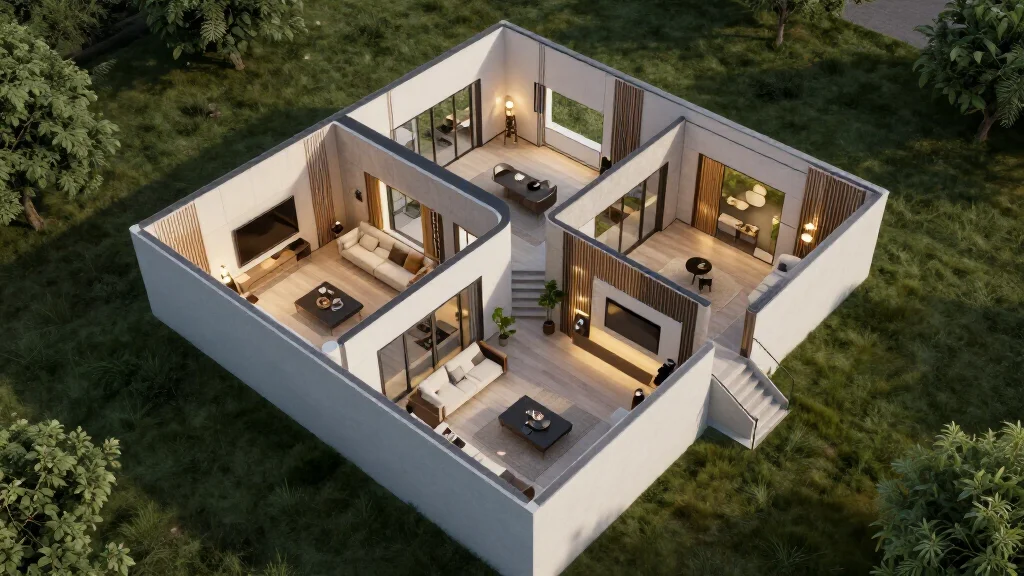
What Separates a House Design App from a Room Design App
Most AI design tools are optimized for single-room work: upload a photo, pick a style, get a render. That works for a bedroom refresh. It does not work for a whole-house renovation where you need:
- Consistent style across 8–15 rooms and transition spaces
- Floor plan awareness: how rooms connect and how sight lines work
- Exterior design coordination with the interior color palette
- A shareable design package for contractors, builders, or family members
The apps below are selected specifically because they support multi-room, multi-area projects — not just single-room redesigns.
Best AI House Design Apps for 2026
AI Smart Decor
Best for: Room-by-room redesign across an entire house with style consistency
| Feature | Detail |
|---|---|
| Price | Free to start |
| Rooms supported | All interior rooms |
| Style library | 20+ styles |
| Output quality | Photorealistic renders |
| Floor plan support | Via photo uploads |
| Exterior design | No |
AI Smart Decor handles whole-house projects by letting you design each room individually while maintaining the same style thread throughout. Upload a photo of your living room, set your style, then apply the exact same direction to your dining room, hallway, kitchen, and bedrooms. The AI produces photorealistic renders that show how each space will actually look — not just color swatches or mood boards.
This is where AI Smart Decor earns its reputation: render quality that reads as professional photography, not a video game screenshot. Free credits let you test several rooms before committing to a plan.
Planner 5D
Best for: Full floor plan creation with room-by-room 3D visualization
| Feature | Detail |
|---|---|
| Price | Free version available, Pro from $14.99/month |
| Floor plan tools | Yes — 2D and 3D |
| AI features | AI room design (paid tier) |
| Exterior modeling | Basic exterior shell |
| VR walkthrough | Yes |
Planner 5D takes a different approach: start with the floor plan, then furnish and style each room within that plan. The 3D walkthrough feature is genuinely useful for understanding how rooms connect and how an open-plan layout reads from different angles. The AI design features are in the paid tier, but the free version's floor plan tools are worth using as a planning foundation before moving to AI rendering.
HomeByMe
Best for: Realistic 3D renders of multi-room layouts with brand-name furniture
| Feature | Detail |
|---|---|
| Price | Free basic, Premium from $25/month |
| Floor plan tools | Yes |
| 3D rendering | Photorealistic (paid) |
| Real brand furniture | Yes |
| AI redesign | Limited |
HomeByMe lets you build out a full home floor plan, furnish each room with real brand products, and generate 360-degree panoramic views. It is stronger on furniture catalog depth than on AI redesign capability — useful if you want to see how specific products from real retailers fit into your house layout.
RoomScan Pro
Best for: Accurate floor plan capture as a starting point for house design
| Feature | Detail |
|---|---|
| Price | $9.99 one-time |
| Floor plan scanning | Yes — uses device sensors |
| Design features | Export only |
| Integration | Exports to CAD tools |
RoomScan Pro is not a design tool by itself, but it solves the most tedious part of whole-house planning: creating an accurate floor plan. Walk through each room and the app generates a measured floor plan you can export into design software. Use it first, then bring your floor plan into Planner 5D or HomeByMe for the design phase.
How to Plan an Entire House with AI
The process for a whole-house project is different from a single-room redesign. Here is a structured approach:
- Capture accurate dimensions: Use RoomScan Pro or measure manually. Know your square footage, ceiling heights, window placements, and door swings before starting any design work.
- Create a floor plan: Import measurements into Planner 5D or HomeByMe. Lay out all rooms and mark which spaces are open to each other (kitchen-to-dining, living-to-hallway).
- Identify your design anchor room: This is usually the living room or kitchen — the most-used space that sets the tone. Design this room first.
- Lock in your whole-house style: In AI Smart Decor, generate several style options for the anchor room. Pick one. Note the exact style name so you can apply it identically to every other room.
- Design room by room, in order of visual connection: After the anchor room, move to spaces you can see from it (dining room, entry, hallway). Design connected spaces together to check visual flow.
- Handle private rooms separately: Bedrooms and bathrooms can vary in intensity from the main style without breaking cohesion. Keep the color palette consistent even if the mood shifts.
- Review all rooms as a set: Lay out renders side by side or use a floor plan view to confirm the house reads as one coherent design, not a collection of individual rooms.
- Export a complete design package: PDF or image exports with room-by-room renders, color codes, and product references for your builder or contractor.
Room-by-Room Planning Checklist
Before designing each space, confirm you have addressed:
Entryway and Hallways
- First impression materials (flooring, wall treatment)
- Storage integration (coat hooks, built-ins)
- Visual connection to adjacent living spaces
Living Room
- Focal point (fireplace, TV wall, view)
- Traffic flow and furniture layout
- Lighting zones (ambient, task, accent)
Kitchen
- Work triangle efficiency (sink, stove, fridge)
- Cabinet style and finish
- Countertop and backsplash material coordination
Dining Room
- Table size relative to room dimensions
- Relationship to kitchen (open plan or separate)
- Lighting centerpiece (pendant, chandelier)
Bedrooms
- Restful palette variation from main floor
- Storage integration
- Natural light management
Bathrooms
- Fixture finish coordination with adjacent bedroom
- Tile pattern and scale
- Ventilation and mirror placement
Outdoor Transition Spaces
- Patio or deck visual connection to interior
- Material continuity (interior floor extending outdoors)
- Exterior color coordination with interior palette
AI House Design App Comparison
| App | Floor Plans | AI Redesign | Exterior | Best For | Price |
|---|---|---|---|---|---|
| AI Smart Decor | No | Yes (all rooms) | No | Interior whole-home | Free+ |
| Planner 5D | Yes | Yes (paid) | Basic shell | Full planning + design | Free+ |
| HomeByMe | Yes | Limited | No | Furniture-accurate 3D | Free+ |
| RoomScan Pro | Yes (scan) | No | No | Floor plan capture | $9.99 |
Common Mistakes in Whole-House AI Design
Designing rooms in isolation. If you design each room without checking how it connects to adjacent spaces, you end up with interiors that look great individually but clash when you stand in a doorway looking from one into the other.
Ignoring transition spaces. Hallways and entryways are often designed last and treated as afterthoughts. They are the connective tissue of your house design — they need to bridge the rooms they connect.
Choosing a style that conflicts with your architecture. Scandinavian minimalism in a Victorian house with ornate moldings creates visual tension. The AI will render it, but you will live with the conflict. Let your existing architecture guide style selection.
Using multiple AI tools with inconsistent rendering styles. Different AI models render the same style differently. If you use one tool for the living room and another for the kitchen, the renders will not match even if the style names are the same. Commit to one tool for the full project.
Skipping exterior coordination. Even if your AI tool does not handle exterior design, you need your interior palette to work with your exterior paint, roofline, and landscaping. Collect exterior references alongside your interior renders.
What to Bring to Your Contractor
A well-prepared AI house design package should include:
- Full floor plan with dimensions
- Room-by-room renders (minimum 2 angles per room)
- Color codes (hex or paint brand references)
- Material specifications (flooring type, tile size, countertop material)
- Furniture dimensions and product links (where possible)
- Lighting placement notes
- Any structural changes required (wall removals, window additions)
The more specific your package, the fewer costly mid-project decisions your contractor has to make on your behalf.
Ready to Design Your House?
Start with your anchor room. Upload a photo to AI Smart Decor, pick a style, and use that render as the foundation for your whole-house direction. Free to start, no credit card required.