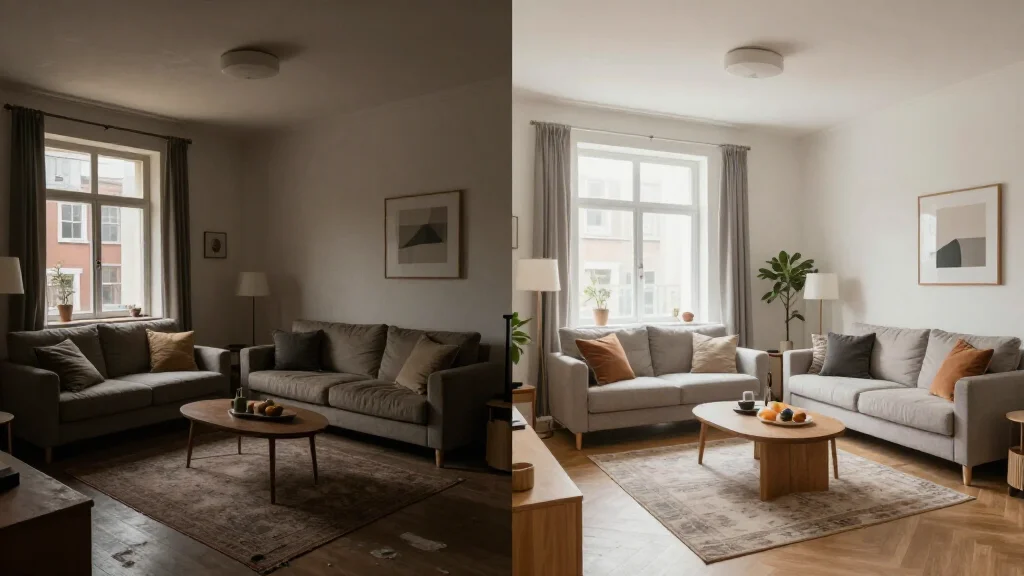
AI room transformation goes beyond subtle changes. It completely reimagines your space from the ground up. Upload a photo of any room and the AI strips away existing furniture and decor, then rebuilds the interior in your chosen style with photorealistic accuracy. The before-and-after results are dramatic.
What Is AI Room Transformation?
AI room transformation uses advanced generative models to completely reimagine a room's interior. Unlike basic redesign tools that adjust colors or swap furniture, transformation technology rebuilds the entire room, including new flooring, wall treatments, furniture, lighting, decor, and styling, while preserving the architectural structure of windows, doors, and walls.
Best AI Room Transformation Tools for 2026
AI Smart Decor
- Best For: Most dramatic AI room transformations
- Price: Free to start
- Features: Complete room transformation, 20+ style themes, Before-after comparison
- Pros: Most dramatic transformations, Highest realism, Free tier
- Cons: HD downloads on premium
Interior AI
- Best For: High-resolution room transformations
- Price: From $29/month
- Features: 4K transformation output, Advanced style control
- Pros: Professional resolution, Fine control
- Cons: No free tier, Higher price
How to Get the Best AI Room Transformation
- Step 1: Photograph your room in landscape orientation with even lighting
- Step 2: Include the full room from one wall to the opposite corner
- Step 3: Upload to the AI transformation tool
- Step 4: Select a transformation style that is different from your current decor
- Step 5: Generate the transformation and compare before-after
- Step 6: Run the same room through three to five different styles
- Step 7: Save the transformation that excites you most
Most Dramatic AI Room Transformations
- Dated 1990s living room transformed into sleek modern minimalist space
- Empty white box apartment reimagined as cozy bohemian retreat
- Dark wood-paneled den converted to bright Scandinavian office
- Generic builder-grade kitchen transformed into custom farmhouse dream
- Boring beige bedroom reimagined as luxurious boutique hotel suite
- Cluttered family room converted to organized mid-century modern showcase
Before-and-After: Why Transformations Go Viral
- The visual contrast between before and after is immediately compelling
- AI transformations demonstrate what is possible without renovation
- Side-by-side comparisons help people imagine their own room's potential
- Social media audiences engage heavily with transformation content
- Real estate agents use transformations to sell property potential
Tips for Sharing AI Room Transformations
- Tip: Use the before-after slider feature for maximum visual impact
- Tip: Export both the before and after images for social media posts
- Tip: Caption the design style used for context
- Tip: Tag the AI tool and use relevant interior design hashtags
- Tip: Pair the transformation with a description of what changes the AI made
Ready to Try It Yourself?
Transform any room dramatically with AI. Upload a photo and see your space completely reimagined, free to start.